Просмотр новости
Найдите то, что Вас интересует
 Спутники
 РН
РН SpaceX
 Роскосмос
 NASA
NASA
СпутникиРНSpaceXРоскосмосNASAMicrosoft 365 Copilot is brilliant with words - but work isn't only words. Introducing SharePoint Copilot Apps: bring rich, interactive UX components straight into the Copilot canvas, built with any JavaScript stack your team already knows. Reuse your existing SPFx investments across Copilot, SharePoint, and Teams - no new platform, no infrastructure, no lock-in.
The post Going beyond text in Microsoft 365 Copilot – Introducing SharePoint Copilot Apps appeared first on Microsoft 365 Developer Blog.
Microsoft 365 Copilot is brilliant at working with language. But work isn’t only words, sometimes you don’t want to describe what you need in a back-and-forth chat – you want to see it, touch it, and act on it right where you already are. Picture approving an expense, checking your remaining leave, or booking a desk – without ever leaving the chat to hunt for the right tool. That’s now possible with the UX components in the Copilot canvas using MCP apps model.
Today we’re excited to introduce SharePoint Copilot Apps – a new way to bring rich, interactive UX components directly into the Copilot canvas, powered by the SharePoint Framework (SPFx).
Introducing SharePoint Copilot Apps – Going beyond text in Microsoft 365 Copilot Chat and text are powerful – but not always enoughThink about how often a simple task turns into a longer conversation. You want to get something quickly reviewed. You need the latest tool – but is it on the intranet, or somewhere else entirely? Describing it all in text takes time you don’t have.
Every hop to a different app, portal, or tool breaks your focus and burns minutes that add up across thousands of people. The cost is the constant context-switching tax on your whole organization.
What if the experience you needed was simply there – directly in the flow of your work, inside the Copilot canvas? You ask to see or do something, and the right UX component appears, ready to use.
That’s exactly what SharePoint Copilot Apps deliver: purpose-built UX components that appear in Copilot at the moment they’re useful, so you can review, decide, and act without leaving the conversation.
For developers: just bring your componentHere’s the part developers will love. To create a Copilot UX component, you only have to focus on one thing – building your UX component. Everything else is provided for you by the platform.
And you build it with the JavaScript stack you already know. SPFx supports any JavaScript library or framework you choose – React, Angular, Vue, Svelte, or plain TypeScript. React is the most widely used, so you’ll see it in most of our examples, but it’s never a requirement. That flexibility is a real advantage: your team ships with the tools it’s already productive in, instead of being forced onto someone else’s stack.
That same standards-based foundation unlocks another advantage: your AI coding agents already know how to build this. Because there’s no proprietary platform or bespoke runtime to learn first, tools like GitHub Copilot, Claude, and Codex – or any other coding agent your team prefers – can scaffold, generate, refactor, and debug these components right inside your IDE of choice. The same JavaScript skills that make these easy for humans also make them easy for coding agents, so you get the full productivity boost of AI-assisted development from day one, exactly where you build. In general, coding agents are already excellent at SPFx development – give it a try.
This is about extending your existing investments onto the Copilot canvas. The SPFx components and patterns your organization has already built carry forward – now reaching a brand-new surface. And this isn’t a new or unproven foundation: the SPFx ecosystem is already enormous, with tens of millions of end users relying on custom SPFx components every single day.
Better still, the same UX component isn’t tied to one surface. Write it once and expose it across Microsoft 365 – in Copilot, in SharePoint, and in Microsoft Teams – reusing a single component across every channel where your people already work, and maximizing the value of your investment. Don’t reinvent – reuse what you’ve already built, and reach your users everywhere.
Introduction to SharePoint Copilot Apps developer experience Example scenariosSo what can you actually build? Almost anything you’ve previously surfaced in a SharePoint portal or as a Microsoft Teams personal app. Any scenario that was once exposed as a web part or UX element in your portals can now be exposed as a UX component – directly in Copilot, using agents. You can even expose the same component in multiple locations – so your end users can select their preferred experience for accessing the same UX component and capabilities.
Here are three example areas of scenarios to spark some ideas on the art of possible:
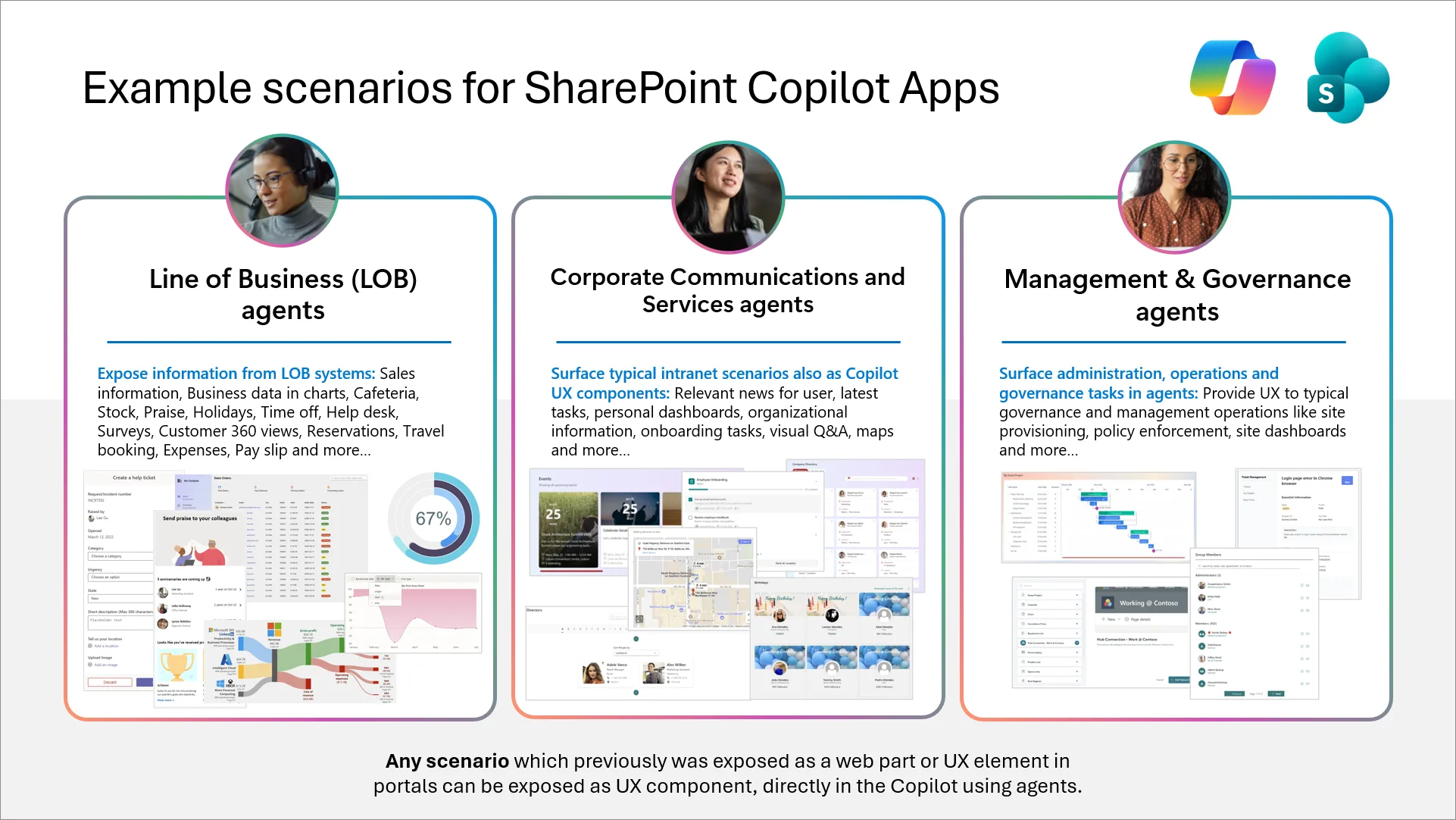
Expose information from your LOB systems right in the Copilot canvas – sales information, business data in charts, cafeteria menus, stock, praise, holidays, time off, help desk, surveys, Customer 360 views, reservations, travel booking, expenses, pay slips, and more.
📣 Corporate Communications and Services agentsSurface your typical intranet scenarios as Copilot UX components – relevant news for the user, the latest information, personal dashboards, organizational information, onboarding tasks, visual Q&A, maps, and more.
⚙️ Management & Governance agentsBring administration, operations, and governance tasks into apps – providing UX for typical governance and management operations such as site provisioning, policy enforcement, site dashboards, and more.
Built on industry standards, with enterprise trustSharePoint Copilot Apps are based on industry standards, implementing the MCP Apps model – so you’re building on an open, interoperable foundation rather than a closed one. It’s the same principle that runs through everything here: open patterns, no lock-in, and components that work across surfaces instead of being trapped on one – and tooling, including AI coding agents, that already speaks your stack.
The key difference from the typical MCP Apps model is that hosting and tool routing are automatic. UX components are automatically hosted in Microsoft 365 tenant, and requests are routed to the right tool for you – there’s nothing to set up, stand up, or wire together. You bring the component; the platform handles the rest.
Why it mattersFor the people building and funding these experiences, the value is clear:
Bringing interactive UX into Copilot opens up an enormous space for innovation – unlocking enterprise experiences across AI-powered work that simply weren’t possible with text alone.
Stay tuned – and try the preview when it lands.
This is just the beginning. We’ll be sharing more demos, videos, guidance, and samples across our open-source and community channels in the weeks ahead.
To stay up to date, join us on our weekly community calls and follow us on LinkedIn and X for the latest Microsoft 365 Platform announcements (including the Copilot area).
We can’t wait to see what you build. 🚀
Happy coding! Sharing is Caring! 🧡
| # | Наименование новости | Тональность | Информативность | Дата публикации |
|---|---|---|---|---|
| 1 | SharePoint Copilot Apps Now in Public Preview: From Intent to Action in Microsoft 365 Copilot | 0 | 7.56 | 09-07-2026 |
| 2 | SharePoint Framework (SPFx) roadmap update – July 2026 | 0 | 11.82 | 30-06-2026 |
| 3 | Microsoft brings Copilot apps together ahead of ‘super app’ overhaul | 0 | 12.88 | 14-08-2026 |
| 4 | Build Once, Run Everywhere: Unified Manifest for Office Add-Ins now Generally Available | 0 | 8.5 | 17-07-2026 |
| 5 | Announcing the preview of the Work IQ Developer Tools | 0 | 8.08 | 06-08-2026 |
| 6 | Copilot ile Microsoft 365 Copilot’u birleştiren yeni Copilot uygulaması duyuruldu | 0 | 17.48 | 13-08-2026 |
| 7 | What’s new in Power Platform: February 2026 feature update | 0 | 11.19 | 17-02-2026 |
| 8 | Custom tools and rich UI for app-based conversations are now in Public Preview | 0 | 9.53 | 22-04-2026 |
| 9 | Public Preview: Your business apps, now part of every conversation | 0 | 10.63 | 02-04-2026 |
| 10 | Microsoft Copilot integrates side-by-side web browser | 0 | 19.93 | 20-09-2026 |