Просмотр новости
Найдите то, что Вас интересует
 Спутники
 РН
РН SpaceX
 Роскосмос
 NASA
NASA
СпутникиРНSpaceXРоскосмосNASASharePoint Copilot Apps are now in public preview, introducing a new way to bring guided, action-oriented business experiences into Microsoft 365 Copilot. By combining natural language reasoning with structured UX, validation, permissions, and deterministic operations, organizations can help users move from intent to trusted outcomes directly in the Copilot flow.
The post SharePoint Copilot Apps Now in Public Preview: From Intent to Action in Microsoft 365 Copilot appeared first on Microsoft 365 Developer Blog.
It’s here. Starting today, SharePoint Copilot Apps are in public preview – and they change what Copilot can do for your users. Instead of describing a task in a back-and-forth chat, users can approve an expense, triage an incident, or run an onboarding checklist as a real, interactive app, right inside the Copilot canvas – not a wall of text.
Here’s the power: you can surface almost any interactive UX component directly in the canvas – filterable data grids, multi-step forms, interactive maps, live charts and KPI dashboards, schedulers, or a purpose-built approval panel. All fully interactive, built with the web stack your team already knows, and no new platform or hosting to stand up. If you can build it on the web, you can bring it into Copilot.
This is the next wave of Copilot: not only better answers, but helping people move from intent to outcome – natural-language reasoning on one side, real guided experiences and business actions on the other.
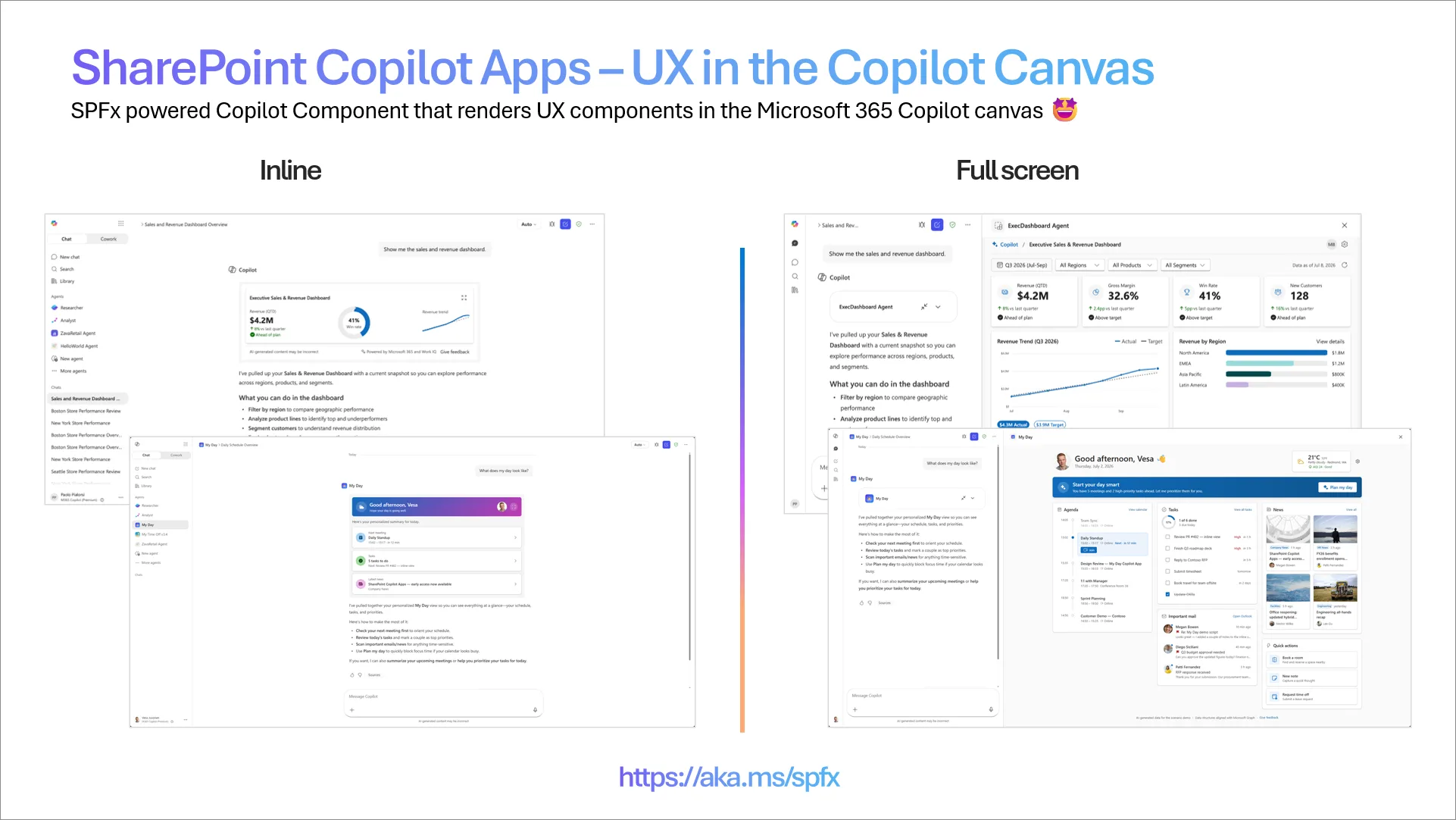
Today we’re excited to announce the public preview of SharePoint Copilot Apps, shipping as part of the SharePoint Framework (SPFx) 1.24 preview. It’s a new way to bring guided, action-oriented experiences into Microsoft 365 Copilot – so users can review, validate, decide, and complete work without leaving the Copilot flow.
The split is simple: Copilot helps users express intent and reason over context; SharePoint Copilot Apps provide the UX, permissions, validation, and dependable operations that actually get the work done. And you build them with the industry-standard web stack, MCP Apps, and the proven SPFx packaging model – hosted automatically in Microsoft 365 tenant, with no extra infrastructure to stand up or run.
Why this mattersMany enterprise workflows can’t end with a generated response. Approvals, updates, submissions, and line-of-business actions need structure, accountability, and predictable execution. SharePoint Copilot Apps connect the flexibility of natural language with the reliability of governed business operations.
This opens up new opportunities to:
Here’s the part developers will love: you focus on one thing – your UX component. The platform does the rest. Microsoft 365 handles hosting, tool routing, security, and governance automatically. There’s nothing to wire together, nothing to operate. Install SPFx 1.24 and your first app can be running in your tenant this afternoon.
Because it’s built on open web standards – not a proprietary runtime – your AI coding agent already knows how to build these. Tools like GitHub Copilot, Claude, and Codex can scaffold, generate, refactor, and debug these components right in your IDE, in the JavaScript stack your team already uses.
Write once, reach everywhereThe same UX component isn’t tied to one surface. Build it once and expose it across Microsoft 365 – in Copilot, in SharePoint, and in Microsoft Teams – reusing a single component everywhere your people already work. Existing SPFx investments carry forward instead of being rebuilt, so you maximize what you’ve already shipped.
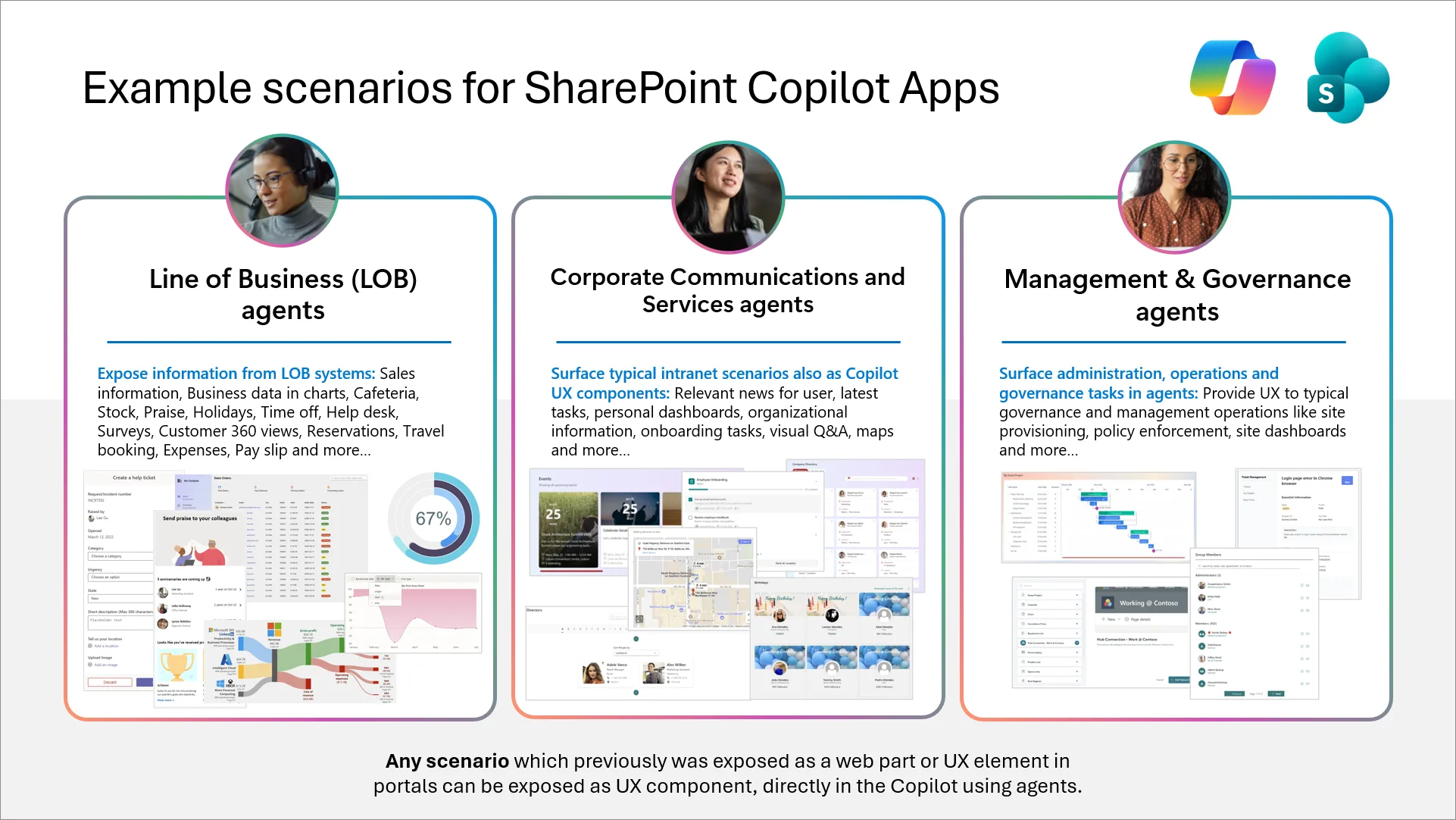
What You Can BuildSharePoint Copilot Apps shine when users need to complete an outcome, not just get an answer: review data, make a decision, validate inputs, and trigger a trusted action. Each solution can render multiple inline experiences and multiple full-screen experiences, surfaced based on user intent.
Examples include approvals, operational dashboards, incident response, onboarding assistants, CRM task panes, project reviews, field operations, workday hubs, procurement requests, support triage, finance updates, and partner-built industry solutions.
Here’s one in action – a My Day scenario that gives users a personal plan and relevant context, powered by Work IQ.
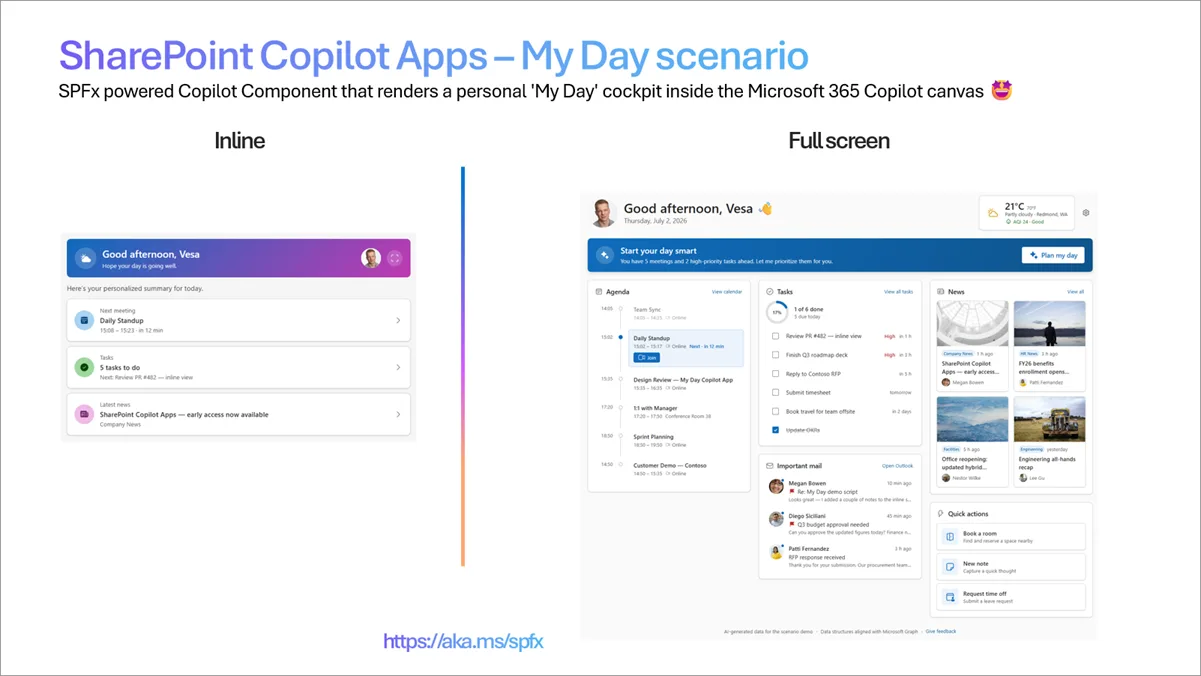
See It in Action: My Day solution
Build UX components for your Copilot agent – My Day scenario – SharePoint Copilot AppsThe demo should make the customer value obvious: Copilot understands intent, the app provides structure, and the user completes the outcome without leaving the Copilot experience.
Built for Enterprise Developers and PartnersSharePoint Copilot Apps are built on SPFx and the modern web stack – JavaScript, TypeScript, React (or Angular, Vue, Svelte – your choice), MCP Apps, and the familiar tools you already use. Create one package with the proven SPFx model and deploy it within your Microsoft 365 tenant, reused across Copilot, SharePoint, and Teams – no rebuilding the core interaction pattern, no custom hosting to operate.
And this isn’t an unproven foundation: the SPFx ecosystem already serves tens of millions of end users every day. This preview extends that install base straight onto the Copilot canvas.
Open to developers everywhereDuring public preview, any developer, in any Microsoft 365 tenant, anywhere in the world, can build SharePoint Copilot Apps – no Microsoft 365 Copilot license required. That’s the lowest possible barrier to entry, by design: customers, partners, MVPs, and ISVs across every region can start today. (Licensing is subject to change before general availability.)
Public preview: considerations and availabilityA few things to know as you get started:
Install the SPFx 1.24 preview – available now from npm
We’re eager to hear from developers, partners, MVPs, enterprise teams, and ISVs building real-world scenarios. Try the preview, share what works, and help shape what comes next. Please send input and feedback via the SharePoint Framework issue list, and join our weekly community calls and follow us on LinkedIn and X for the latest Microsoft 365 platform announcements.
More details and documentation
SharePoint Copilot Apps are a major step toward making Copilot a place where people move from intent to trusted outcome. Built on SPFx, powered by modern web technologies, and hosted in Microsoft 365, this preview gives customers, partners, and developers everywhere a practical path to bring real business operations into the Copilot canvas.
Move users from intent to outcome. Install the SPFx 1.24 preview. Build your first SharePoint Copilot App today.
We can’t wait to see what you build. 🤩
Note: “SharePoint Copilot Apps” is a working name for public preview and may change before general availability.
| # | Наименование новости | Тональность | Информативность | Дата публикации |
|---|---|---|---|---|
| 1 | Going beyond text in Microsoft 365 Copilot – Introducing SharePoint Copilot Apps | 0 | 9.53 | 23-06-2026 |
| 2 | Announcing the preview of the Work IQ Developer Tools | 0 | 8.08 | 06-08-2026 |
| 3 | SharePoint Framework (SPFx) roadmap update – July 2026 | 0 | 11.82 | 30-06-2026 |
| 4 | Microsoft brings Copilot apps together ahead of ‘super app’ overhaul | 0 | 12.88 | 14-08-2026 |
| 5 | Copilot ile Microsoft 365 Copilot’u birleştiren yeni Copilot uygulaması duyuruldu | 0 | 17.48 | 13-08-2026 |
| 6 | Build Once, Run Everywhere: Unified Manifest for Office Add-Ins now Generally Available | 0 | 8.5 | 17-07-2026 |
| 7 | Microsoft suddenly pulls new Microsoft 365 Copilot feature after rollout with no explanation | 0 | 13.67 | 05-08-2026 |
| 8 | Microsoft 365 Copilot 16.0.20228.20042 beta by Microsoft Corporation | 0 | 1 | 07-07-2026 |
| 9 | Microsoft 365 Business: Copilot используют немногие, но цены растут | 0 | 7 | 08-07-2026 |
| 10 | Microsoft canceled Copilot Search for Outlook after user outrage, in a rare AI reversal | 0 | 6.01 | 28-07-2026 |