Просмотр новости
Найдите то, что Вас интересует
 Спутники
 РН
РН SpaceX
 Роскосмос
 NASA
NASA
СпутникиРНSpaceXРоскосмосNASAA creator running an affiliate program asked us a great question on the support forum recently. They wanted their top affiliate’s audience to get a small thank-you discount when they checked out through that affiliate’s link, not a public sale code the affiliate had to remember to mention. Paid Memberships Pro already supports this, with (more...)
A creator running an affiliate program asked us a great question on the support forum recently. They wanted their top affiliate’s audience to get a small thank-you discount when they checked out through that affiliate’s link, not a public sale code the affiliate had to remember to mention.
Paid Memberships Pro already supports this, with no extra plugin, no code recipe, and no setting to flip. The behavior is built into the Lightweight Affiliate Tracking Add On. Here is how to set it up, what your customer sees, and a couple of edge cases to know about.
PMPro stores affiliate codes and discount codes in two separate places, but it looks them up using the same value. The Affiliates Add On takes advantage of that overlap.
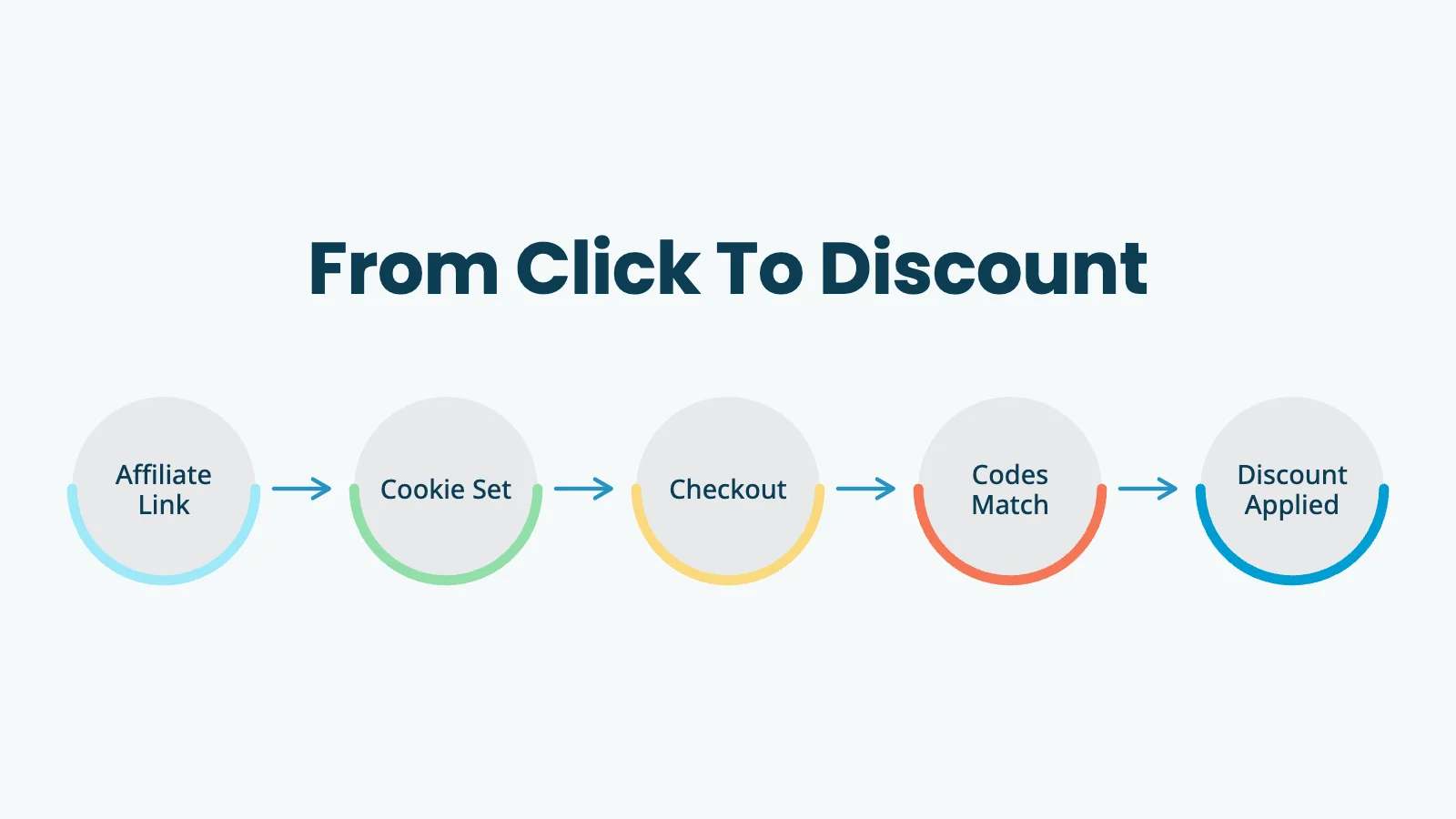
When a visitor lands on your site through an affiliate link like yoursite.com/?pa=KAYLA10, the Add On sets a cookie with the affiliate’s code. When that visitor reaches checkout, PMPro asks one extra question: is there a discount code with the value KAYLA10? If a discount code by that exact name exists and applies to the level being purchased, it is set as the default for the order.
That is the entire mechanism. You create one discount code with the same value as one affiliate code. From there, the discount applies automatically every time someone uses that affiliate’s link. Affiliate codes are flexible that way. The same field also doubles as campaign attribution if you create a code for each ad or traffic source.
 When to Use an Affiliate-Exclusive Discount
A few real-world cases where this setup pays off:
The common thread is that you want the referral tracking and the discount tied together, so one action on the customer’s side produces two outcomes for you: a tracked referral and an applied discount.
Step 1: Find or Create the Affiliate CodeYou’ll need the Lightweight Affiliate Tracking Add On active and at least one affiliate code already set up. If you haven’t done that yet, the Managing Affiliates with Paid Memberships Pro post covers the basics.
In your WordPress admin, go to Memberships > Affiliates. Either pick an existing affiliate or click “Add New Affiliate” to create one.
The field that matters here is Code. This is the value that goes into the ?pa= parameter on the affiliate’s referral links. Pick something readable, unique, and easy for the affiliate to share aloud or paste into an email. We will reuse this value verbatim in the next step.
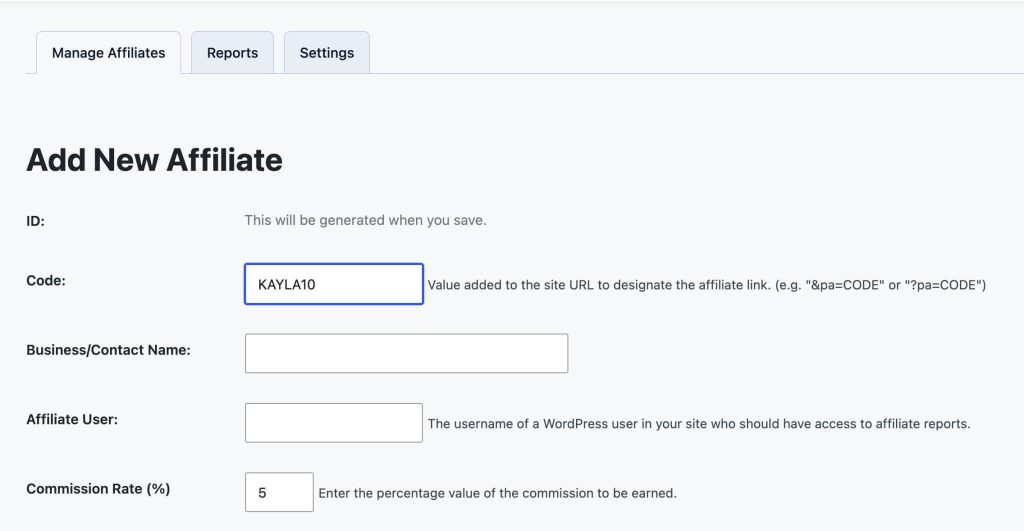
A few patterns we see work well:
Note: Keep it letters and numbers only. The Affiliates Add On strips other characters from the URL parameter, so dashes, underscores, and spaces can cause mismatches.
Step 2: Create a Discount Code With the Same ValueNow go to Memberships > Settings > Discount Codes and click “Add New Discount Code”.
In the Code field, type the exact same value you used for the affiliate code. This is the only field that has to match. Everything else (start date, expiration, levels, initial payment discount, billing amount discount) is configured exactly like any other Paid Memberships Pro discount code.
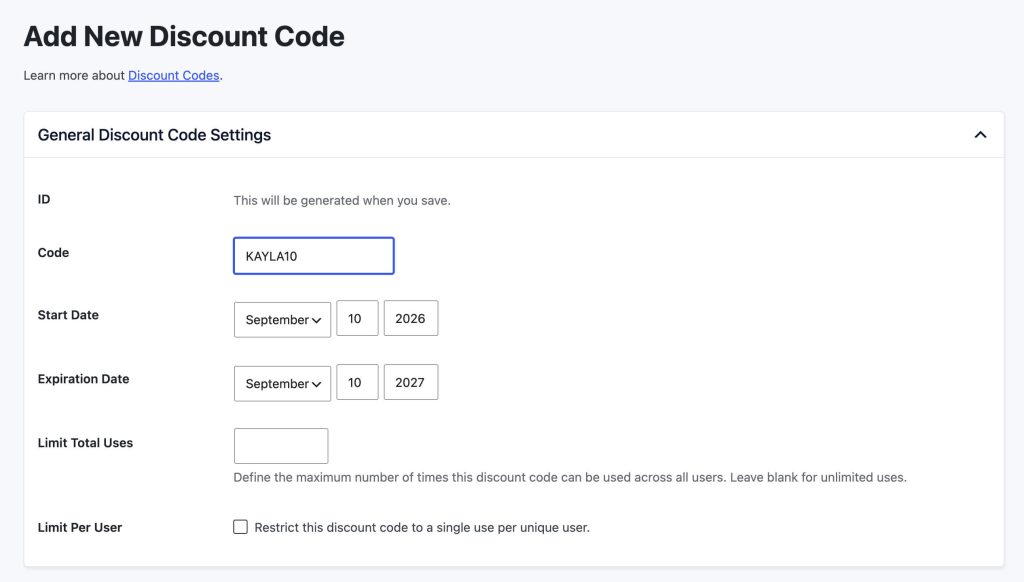
A few setup tips:
Save the code. That is the entire setup.
Step 3: Test the LinkOpen the affiliate’s link in an incognito or private browser window and walk through checkout. Confirm the discount applies automatically and the affiliate is credited in the order details before you send the link to anyone.
What Your Customer Sees at CheckoutWalking through this from the customer side helps explain the behavior to your affiliate partners.
yoursite.com/levels/?pa=KAYLA10.pa parameter and sets the pmpro_affiliate cookie for the number of days you configured on that affiliate.The discount code field is pre-filled, not hidden. A curious customer can see it. That is fine for most affiliate programs, but if you want to hide it entirely, see our 9 Ways to Customize Discount Codes With Paid Memberships Pro post for the snippet to remove the field from view.
Edge Cases to Know AboutA handful of small details will save you support tickets.
KAYLA10 will match a discount code of kayla10 or Kayla10. Pick one casing convention and stick with it for clarity, but if you mistype, the match will still work.If you are already running an affiliate program through the Lightweight Affiliate Tracking Add On, this is a five-minute upgrade. Pick one of your active affiliates, create a discount code with their exact code value, and watch the next referral come through with the price already adjusted.
If you have not started an affiliate program yet, the Managing Affiliates with Paid Memberships Pro post is a good place to start. The Lightweight Affiliate Tracking Add On is included with every paid Paid Memberships Pro plan, so you may already have access.
Small, well-targeted discounts move the needle on conversion more reliably than big public sales. Tying that discount to your affiliate network is one of the quieter, more powerful ways to do it.
Author: Sam Daugherty
Sam Daugherty is the Sales and Marketing Manager at Paid Memberships Pro. Sam oversees content marketing, social media management, community engagement, and event management, all while ensuring that documentation is clear and up-to-date for users.
She values the supportive team environment at Paid Memberships Pro and appreciates the company’s commitment to work-life balance, where "being human first" is a guiding principle.
Outside of work, Sam finds joy in creative hobbies like quilting. She’s also an avid reader. Sam loves spending quality time with her dog. Family time is also a priority for her, and she believes in making the most of moments spent with loved ones.
Free Download: The AI-Powered Membership Site Blueprint
Download the free guide: Learn how to plan, build, and grow a membership site using AI as your strategic partner: from buyer persona to launch and beyond.
Was this article helpful?
YesNo
| # | Наименование новости | Тональность | Информативность | Дата публикации |
|---|---|---|---|---|
| 1 | Offer Members a Discounted Rate for Upgrading to a Higher Level | 0 | 6.53 | 16-09-2026 |
| 2 | How to Build a Private Vendor Portal or Gated Catalog with Paid Memberships Pro | 0 | 9.29 | 18-09-2026 |
| 3 | Become an annual member to avail 30% off | 0 | 15.76 | 18-09-2026 |
| 4 | Настройка премиальной системы комиссионных для партнеров | 0 | 5 | 11-11-2016 |
| 5 | gb04f87qd8 — 14 дней подписки бесплатно ДЛЯ ВСЕХ. До 19.07 ... | 0 | 5 | 17-07-2026 |
| 6 | [Guest Member Blog] Why Many Publishers Are Undervaluing The True Scale And Commercial Power Of Their Authenticated Audiences | 0 | 9.84 | 29-07-2026 |
| 7 | ТОЛЬКО СЕГОДНЯ! Cкидка от BEFREE Забирайте прямо с сайта https://advent.prfl.me/space_discount/zx72i6?erid=2RanymFF52j ... | 0 | 6.48 | 19-08-2026 |
| 8 | Как купить со скидкой: промокоды, кэшбэк и умный стек экономии | 0 | 7.09 | 31-07-2026 |
| 9 | Best WordPress Membership Plugin for Directory Sites (For Most People): Why Block-Level Visibility Rules Win | 0 | 14.24 | 04-06-2026 |
