Просмотр новости
Найдите то, что Вас интересует
 Спутники
 РН
РН SpaceX
 Роскосмос
 NASA
NASA
СпутникиРНSpaceXРоскосмосNASAWelcome to Tool Tip Tuesday for Adobe Premiere on ProVideo Coalition If you’re shooting with multiple cameras for an interview or any other typical multi-camera shoot, and you’re not using the traditional Create Multi-Camera Source Sequence workflow, you may just want to sync a few angles right in the Premiere timeline. And that’s easy enough: stack [...]Read More... from Tool Tip Tuesday for Adobe Premiere: Sync adjacent clips in the timeline
If you’re shooting with multiple cameras for an interview or any other typical multi-camera shoot, and you’re not using the traditional Create Multi-Camera Source Sequence workflow, you may just want to sync a few angles right in the Premiere timeline. And that’s easy enough: stack the angles in the timeline one on top of the other, select all the angles, right-click, and choose Synchronize.
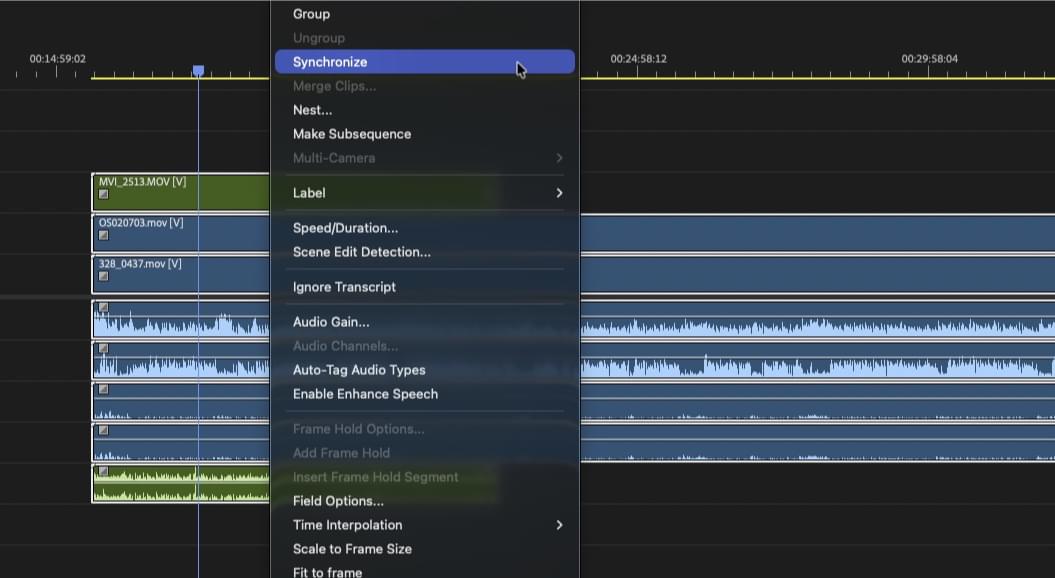 This in-timeline sync method is easy enough if you have multiple angles you want to sync.
But this method gets tricky if you have multiple adjacent clips from the same camera on the same track. The in-timeline Synchronize doesn’t work.
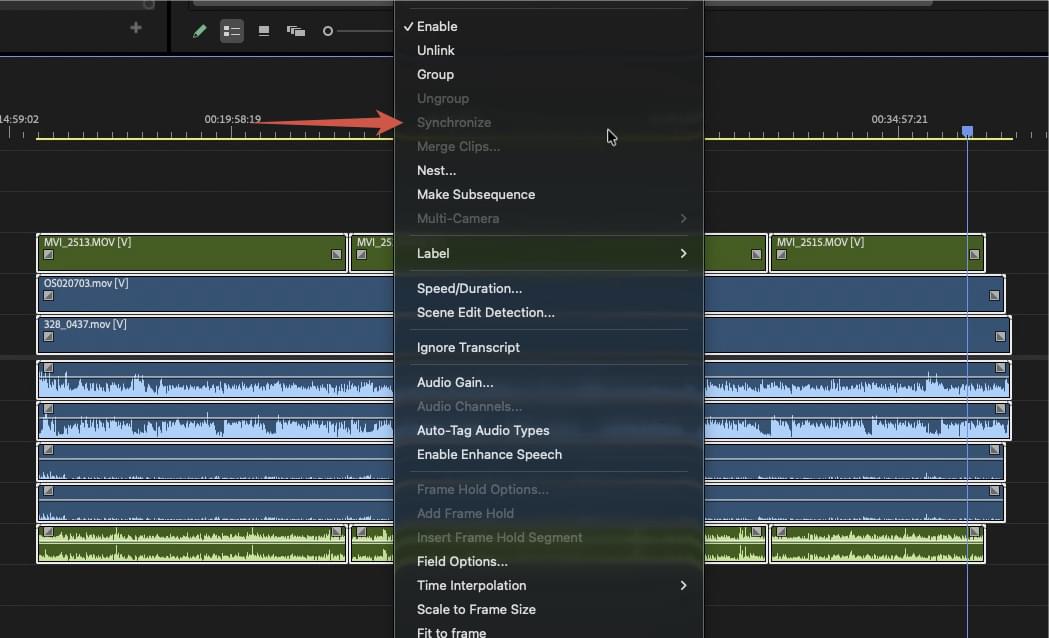 In the multi-cam shoot above, camera 3 clips are colored in green and the camera had multiple start stops. So trying to use the in-timeline Synchronize doesn’t work as that option is grayed out.
This is a rather strange quirk of Adobe Premiere. But the key to making this work is to place both the audio and the video of the adjacent clips onto their own track.
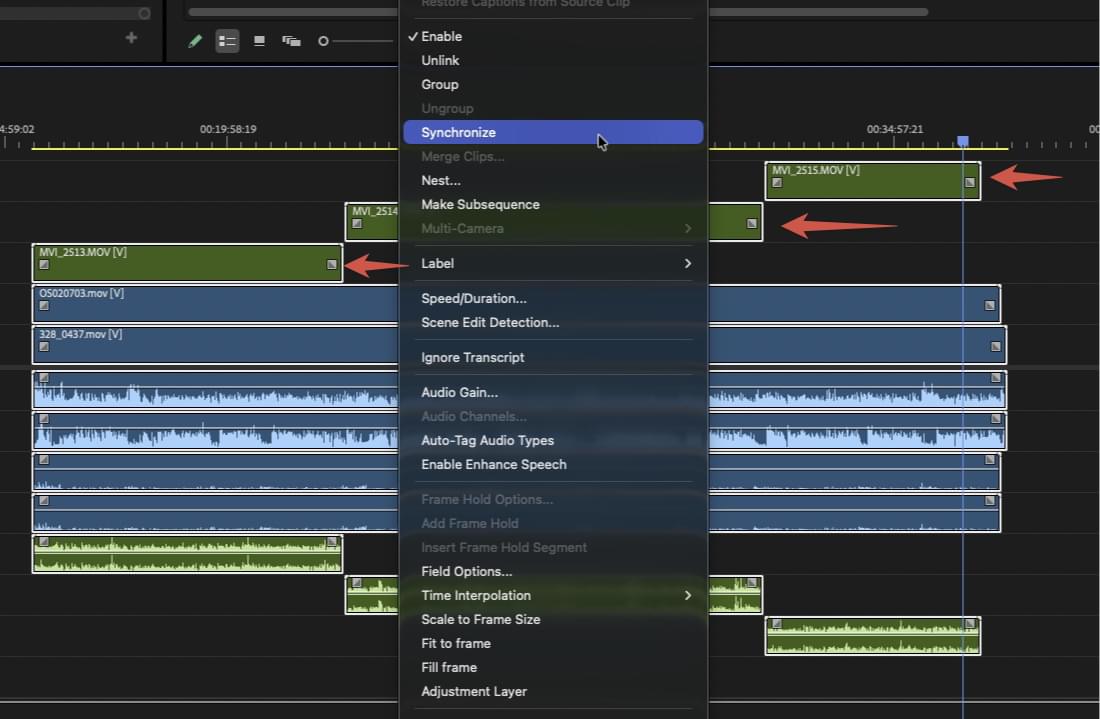 Once the audio and video of clips from the same camera are placed on their own track, then the in-timeline Synchronize will work.
This technique might not be doable if you have an extensive multi-cam production where you’ve got many starts and stops on multiple angles over a long recording time. That’s a place where traditional multi-cam creation from a Premiere bin would be in order. But for the quick sync of smaller multi-cam shoots or a place where you have just one camera that has starts and stops, this is a quick option.
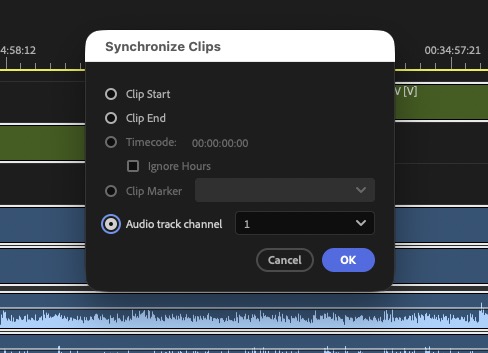 In this scenario, you are probably syncing with audio waveform, but this also will work with timecode.
This series is courtesy of Adobe.
| # | Наименование новости | Тональность | Информативность | Дата публикации |
|---|---|---|---|---|
| 1 | Tool Tip Tuesday for Adobe Premiere: Show Video Thumbnails | 0 | 7.04 | 14-07-2026 |
| 2 | Tool Tip Tuesday for Adobe Premiere: Hover Scrub | 0 | 10.71 | 21-07-2026 |
| 3 | Adobe Premiere is adding a Generative Media Tool | 0 | 8.06 | 10-07-2026 |
| 4 | Комментарий к записи Вредные и опасные продукты для кошек (Биоконтроль) | 0 | 0 | 17-02-2025 |
| 5 | Fini janjeći kotleti sa špinatom | 0 | 0 | 26-02-2025 |
| 6 | Föreslagna regiondirektören petades från kommundirektörspost efter 21 månader | 0 | 0 | 07-02-2023 |
| 7 | Ольга Тимофеева: следующее заседание рабочей группы по совершенствованию пенсионного законодательства пройдет 24 сентября | 0 | 0 | 13-09-2018 |
| 8 | Акша: Вечер 11 июл, Чт | 0 | 0 | 10-07-2019 |
| 9 | Уволены зачинщики конфликта в студенческом общежитии Новомосковска | 0 | 0 | 18-02-2020 |
| 10 | Mick Schumacher: Formel 1 schon im nächsten Jahr? DAS sagt Ferrari | 0 | 0 | 03-01-2020 |