Просмотр новости
Найдите то, что Вас интересует
 Спутники
 РН
РН SpaceX
 Роскосмос
 NASA
NASA
СпутникиРНSpaceXРоскосмосNASAFlux is a fast, minimalist GTK4 file manager for Linux with archive browsing, network access, content search and extensive keyboard control.
The post Flux – multi-threaded Linux file manager appeared first on LinuxLinks.

Flux is a minimalist file manager for Linux written in Rust. It combines a GTK 4 and libadwaita interface with asynchronous file handling, aiming to remain responsive even when browsing directories containing thousands of files or generating large numbers of thumbnails.
Despite the minimalist description, Flux offers considerably more than basic file browsing. It can explore compressed archives as though they were ordinary directories, connect to remote servers through GVFS, unlock LUKS-encrypted volumes and search within the contents of files. There is also an embedded terminal and extensive keyboard control.
I evaluated Flux on CachyOS, an Arch-based distribution that has quickly established itself as one of the finest Linux distributions available. Flux is currently at version 0.1.0 and should be regarded as relatively young software, but its combination of speed, attractive presentation and useful advanced features makes it an interesting alternative to established file managers.
InstallationFirst, you need to install the program’s dependencies. On my test system, all of them are already present.
$ sudo pacman -S libadwaita gtk4 glib2 pango graphene cairo gdk-pixbuf2 ffmpeg imagemagick
Next clone the project’s GitHub repository.
$ git clone https://github.com/killown/flux.git
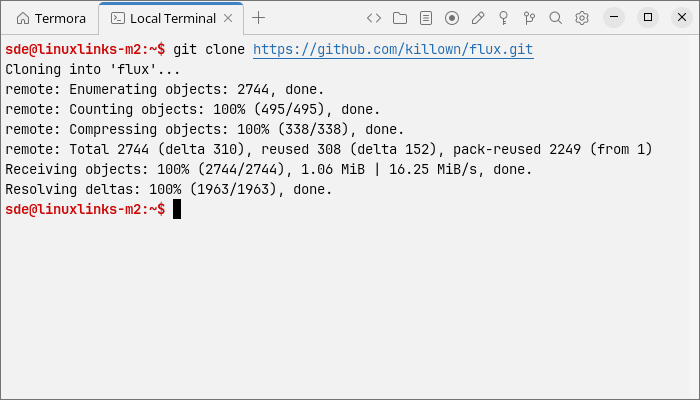
Change into the newly created directory.
$ cd flux
Build the source code.
$ cargo build --release

The compiled executable is placed at target/release/flux-fm. You can launch it directly with:
$ ./target/release/flux-fm
To make Flux available system-wide, copy the executable to /usr/local/bin.
$ sudo install -Dm755 target/release/flux-fm /usr/local/bin/flux-fm
If you want to use Flux’s additional functionality, there are some optional runtime dependencies. Install cryptsetup and udisks2 for handling LUKS-encrypted volumes. Network browsing requires gvfs and the appropriate GVFS back ends, such as gvfs-smb for Samba shares and gvfs-nfs for NFS resources.
Flux has a clean, modern interface. A sidebar provides quick access to common locations, mounted drives and recently used files, while the main pane displays files in a spacious thumbnail grid. Navigation controls and breadcrumb buttons sit along the top, together with options for sorting, filtering and switching views. A status bar at the bottom shows details about the selected file.
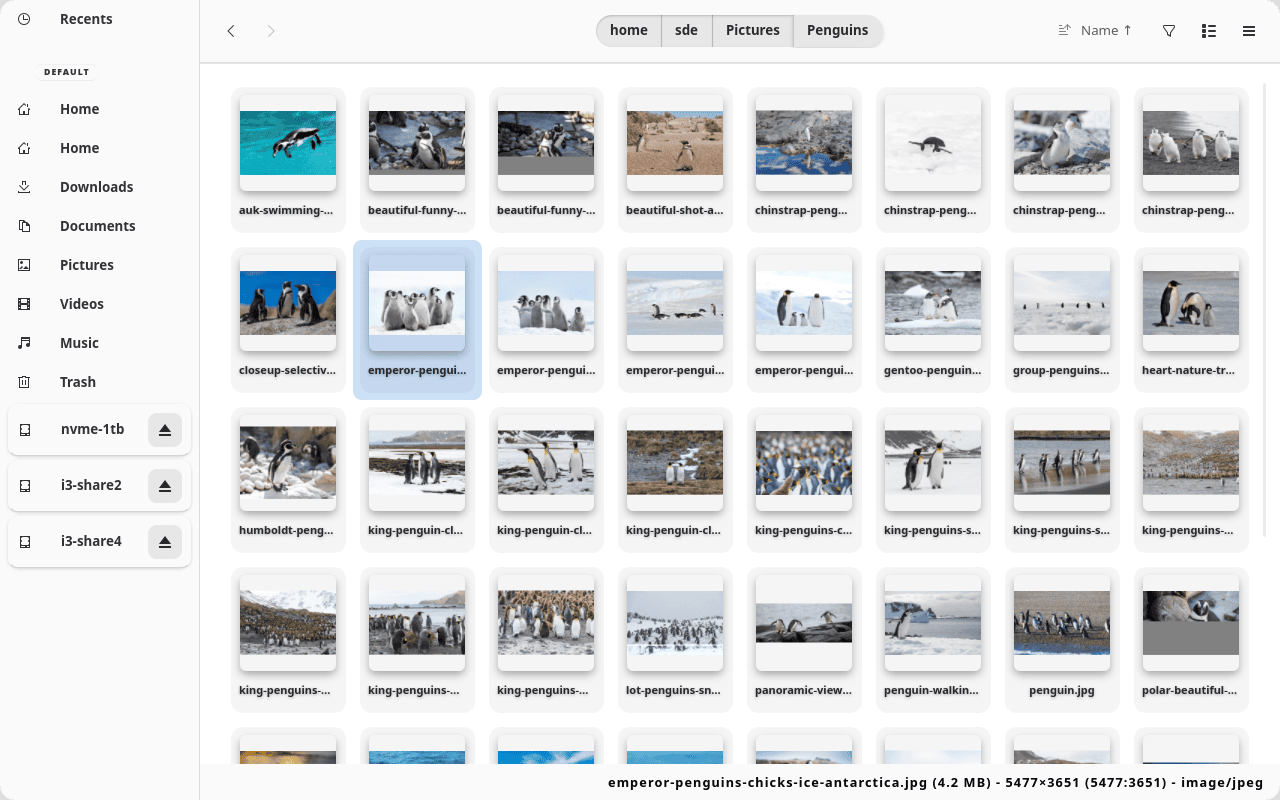 Click image for full size
>10MB, <500KB and 10MB..50MB.~/.config/flux/config.toml file.Flux is a promising file manager that pairs an attractive, uncluttered interface with an unusually broad set of features. Archive browsing, content searching, network access, encrypted-volume support and the embedded terminal give it capabilities extending well beyond simple file management. It remains young software, but it is already responsive, highly keyboard-friendly and well worth watching.
Website: github.com/killown/flux
Support:
Developer: Thiago Lucio
License: GNU General Public License v3.0
Flux is written in Rust. Learn Rust with our recommended free books and free tutorials.
| GTK File Managers | |
|---|---|
| Double Commander | File manager with two panels side by side |
| PCManFM | Slim and useful, but not to have any feature bloat |
| Files | File browser designed for elementary OS; loose fork of GNOME Files |
| GNOME Files | Simple file manager for GNOME |
| GNOME Commander | Two-panel graphical file manager |
| 4Pane | Multi-pane, detailed-list file manager |
| Sunflower | Small and highly customizable twin-panel file manager |
| Thunar | xfce’s file manager |
| Tux Commander | Windowed file manager with two panels side by side |
| A couple of GNOME Files forks are also worth mentioning. | |
| Nemo | File manager for the Cinnamon desktop environment |
| Caja | File manager for the MATE desktop |
Read our verdict in the software roundup.
 Explore our comprehensive directory of recommended free and open source software. Our carefully curated collection spans every major software category.
This directory is part of our ongoing series of informative articles for Linux enthusiasts. It features hundreds of detailed reviews, along with open source alternatives to proprietary solutions from major corporations such as Google, Microsoft, Apple, Adobe, IBM, Cisco, Oracle, and Autodesk.
You’ll also find interesting projects to try, hardware coverage, free programming books and tutorials, and much more.
Discovered a useful open source Linux program that we haven’t covered yet? Let us know by completing this form.
| # | Наименование новости | Тональность | Информативность | Дата публикации |
|---|---|---|---|---|
| 1 | COSMIC Files – file manager designed for the COSMIC desktop environment | 0 | 8.02 | 17-08-2026 |
| 2 | Zeta – fast dual-pane terminal file manager | 0 | 13.76 | 19-08-2026 |
| 3 | Portfolio – minimalist, touch-friendly file manager | 0 | 16.48 | 17-08-2026 |
| 4 | Motrix Next – full-featured download manager | 0 | 15.19 | 17-08-2026 |
| 5 | 14 Best Free and Open Source Graphical Download Managers | 0 | 8.55 | 19-08-2026 |
| 6 | Terax – terminal-first AI-native development workspace | 0 | 21.25 | 19-08-2026 |
| 7 | Infinity Linux – lightweight Arch Linux-based distribution | 0 | 13.7 | 19-08-2026 |
| 8 | linktui – manage Wi-Fi, Bluetooth, and WireGuard VPN connections | 0 | 11.81 | 18-08-2026 |
| 9 | QDM – download manager | 0 | 15.55 | 18-08-2026 |
| 10 | 8 Best Free and Open Source AppImage Package Managers | 0 | 9.86 | 18-08-2026 |