Просмотр новости
Найдите то, что Вас интересует
 Спутники
 РН
РН SpaceX
 Роскосмос
 NASA
NASA
СпутникиРНSpaceXРоскосмосNASAFastFlowLM puts the Minisforum N5 Pro’s 50 TOPS AMD XDNA 2 NPU to work under Linux for local LLMs and private AI server workloads.
The post Minisforum N5 Pro NAS – NPU with FastFlowLM appeared first on LinuxLinks.
The Minisforum N5 Pro is a five-bay NAS with considerably more computing power than the typical home or small-business storage appliance. At its heart is AMD’s Ryzen AI 9 HX PRO 370, a 12-core, 24-thread processor that gives the system serious potential beyond simply serving files. Storage expansion is equally impressive, with five SATA drive bays complemented by multiple M.2/U.2 slots.
One capability I did not explore during my review was the processor’s integrated NPU. Based on AMD’s XDNA 2 architecture, it delivers up to 50 TOPS of dedicated AI performance and can handle workloads such as image recognition and document analysis without tying up the CPU. This makes the N5 Pro an intriguing platform for private, always-on AI services.
FastFlowLM provides a practical way to put that NPU to work. This lightweight runtime runs large language models directly on AMD XDNA 2 hardware, largely leaving the CPU and Radeon GPU available for storage, media and other services. Processing takes place locally, so prompts and responses remain on the NAS rather than being sent to the cloud.
Linux support is still comparatively new and requires the correct amdxdna driver, firmware and XRT stack, but once configured, FastFlowLM turns an otherwise underused component into an energy-efficient local AI accelerator.
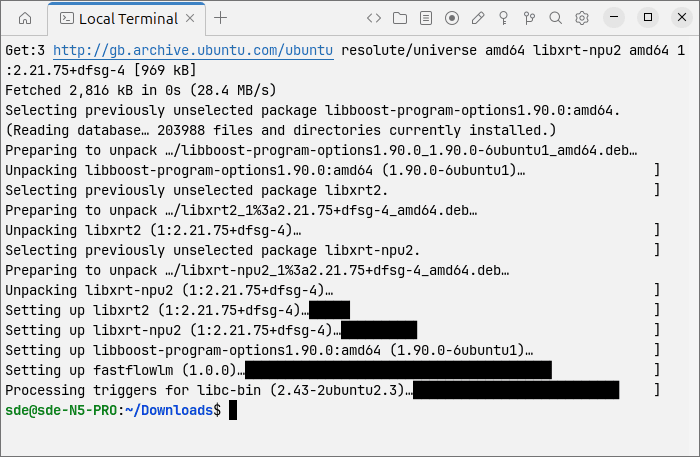
Installing FastFlowLMAs my N5 Pro is running Ubuntu 26.04 LTS, I downloaded the appropriate DEB package from the official FastFlowLM releases page.
$ wget https://github.com/ROCm/FastFlowLM/releases/download/v1.0.0/fastflowlm_1.0.0_ubuntu26.04_amd64.deb
I then installed the package with dpkg.
$ sudo dpkg -i ./fastflowlm_*.deb
The installation reported a few missing dependencies. The following command downloaded and installed them, completing the FastFlowLM installation.
$ sudo apt -f install
$ flm validate
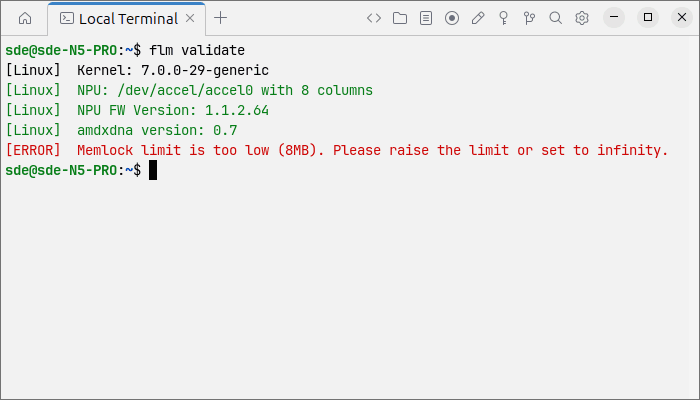
The validation check reported that the locked-memory limit was too low, so I edited /etc/security/limits.conf.
$ sudo nano /etc/security/limits.conf
I added the following lines at the bottom of the file.
* soft memlock unlimited
* hard memlock unlimited
I then rebooted the system for the changes to take effect.
$ sudo reboot
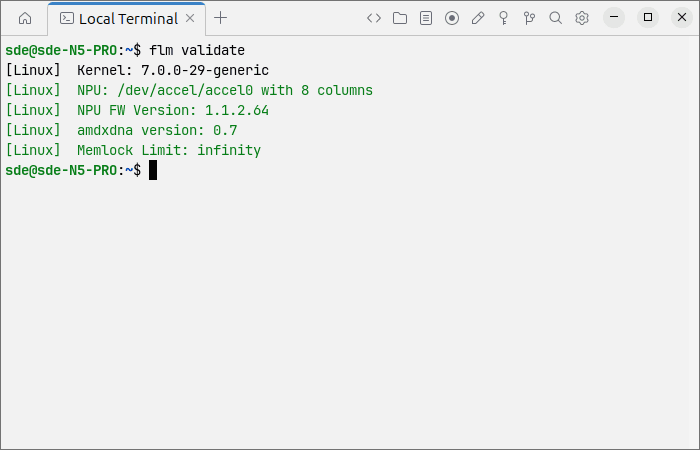
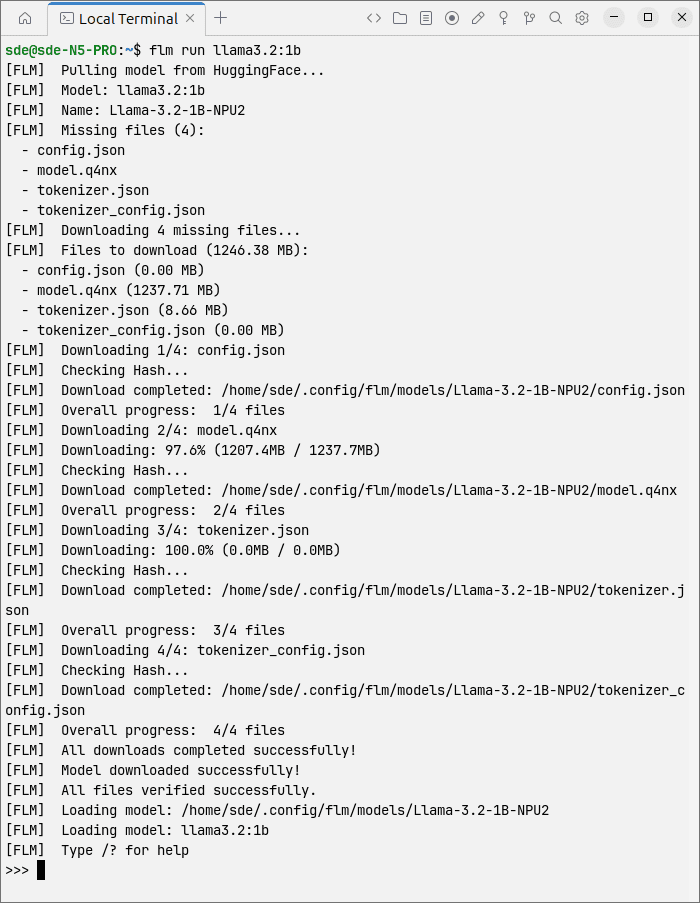
Everything now looks good, so let’s run a small model to confirm that the complete NPU stack is working.
$ flm run llama3.2:1b
FastFlowLM includes a dedicated benchmark command:
$ flm bench llama3.2:1b
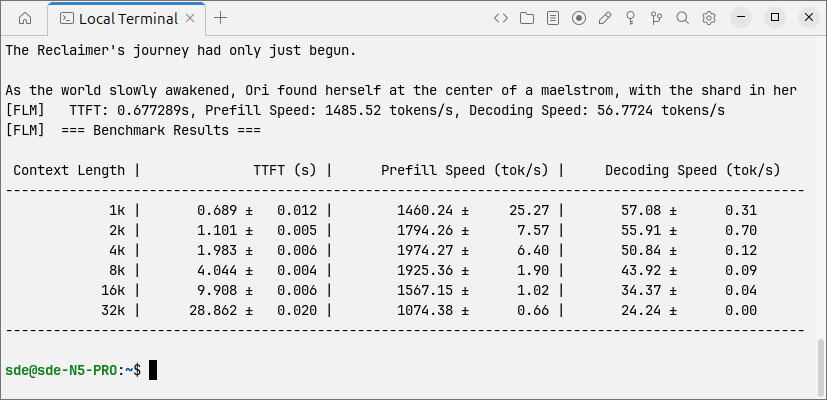
The benchmark confirms that this small model is very usable on the NPU.
The only weakness is time to first token with very long contexts: nearly 29 seconds at 32K. For ordinary chat and document work at shorter context lengths, throughput is excellent, especially given that the NPU leaves the CPU and GPU available for other work.
By default, FastFlowLM 1.0 performs two iterations at each context length. To use four iterations:
$ flm bench llama3.2:1b --bench-iterations 4
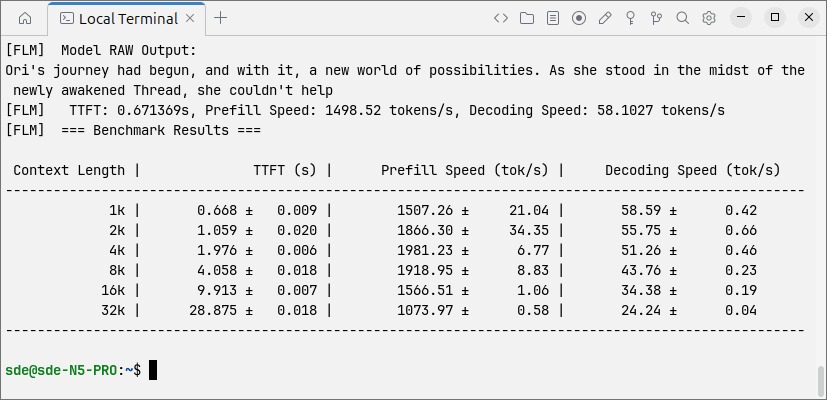
The llama3.2:1b model contains roughly one billion parameters. It is designed for lightweight local chat, summarising, rewriting and simple information extraction. However, its answers, reasoning and coding ability are significantly weaker than those of larger models.
My N5 Pro currently has 32GB of RAM. With that memory amount, 8B–9B is probably the best everyday model size.
$ flm bench qwen3:8b
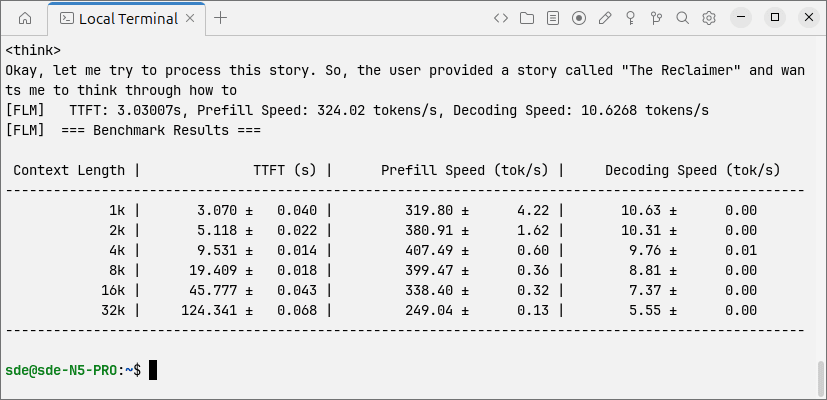
At shorter context lengths, the 8B model reaches 10.6 tokens/s. This is usable, although not especially fast. It remains reasonably responsive with short prompts, but a 32K context is painfully slow: more than two minutes elapse before the first token appears.
Running FastFlowLM as a ServerFastFlowLM includes an OpenAI-compatible server mode, allowing the N5 Pro to operate as a local, NPU-powered AI server.
To make it available over the LAN, I started it with:
$ flm serve llama3.2:1b --host 0.0.0.0 --port 52625
The model name can be replaced with any model supported by FastFlowLM. I can then send a query from another computer:
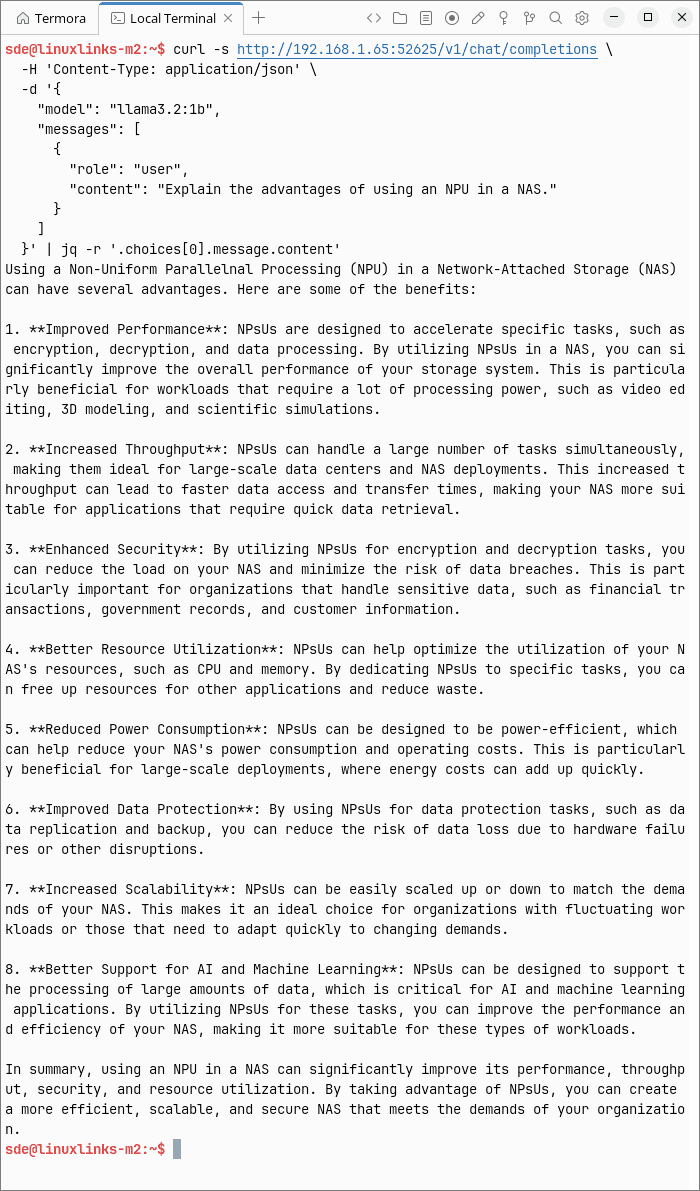
Performance with small models is excellent, while an 8B model remains usable for everyday local AI tasks, although very long contexts introduce substantial delays. The OpenAI-compatible server mode is particularly appealing, effectively turning the N5 Pro into a private AI server for other machines on the LAN while leaving the CPU and GPU available for the NAS’s other duties.
Linux support for XDNA 2 is still comparatively new, but that should not be confused with being difficult to use. With the required driver and runtime stack already available, getting FastFlowLM running on the NPU proved relatively painless and adds another genuinely useful role to an already unusually capable NAS.
Complete list of articles in this series:
| Minisforum N5 Pro NAS | |
|---|---|
| Hardware Review | Five-Bay NAS with Ryzen AI 9 Power |
| MinisCloud OS | Customised Linux NAS operating system |
| NPU | Using the NPU with FastFlowLM |
| More articles to be published next week | |
| # | Наименование новости | Тональность | Информативность | Дата публикации |
|---|---|---|---|---|
| 1 | The Ryzen AI Powered BeeLink SER9 Pro Mini PC | 0 | 12.37 | 25-02-2025 |
| 2 | HS5 – self-hosted object storage service | 0 | 18.42 | 18-08-2026 |
| 3 | В коде Linux обнаружили новые мобильные процессоры AMD Medusa Point | 0 | 15.34 | 25-08-2026 |
| 4 | NVIDIA Finally Releases GeForce NOW for Linux | 0 | 16.08 | 14-08-2026 |
| 5 | Тест и обзор: UGREEN NASync iDX6011 Pro — NAS премиум-класса с локальными функциями ИИ | 0 | 17.85 | 12-08-2026 |
| 6 | Terax – terminal-first AI-native development workspace | 0 | 21.25 | 19-08-2026 |
| 7 | Beelink выпускает мини-ПК ME Pro NAS на базе гибридного процессора AMD Ryzen AI 9 HX 470 | 0 | 19.86 | 12-08-2026 |
| 8 | Linux finally follows Windows and makes a CPU feature requirement mandatory | 0 | 13.26 | 16-08-2026 |
| 9 | Нейро сети для самых маленьких. Часть первая (которая после нулевой). Удобство в прокрустовом ложе оптимизации | 0 | 7.54 | 01-07-2026 |
| 10 | AMD Ryzen AI Halo Box RGB LED Driver Inches Closer To The Mainline Kernel | 2 | 7 | 09-07-2026 |