Просмотр новости
Найдите то, что Вас интересует
 Спутники
 РН
РН SpaceX
 Роскосмос
 NASA
NASA
СпутникиРНSpaceXРоскосмосNASALost sales are a nightmare for any store owner. With the new Abandoned Cart Recovery for Easy Digital Downloads, you can automatically track abandoned carts and send targeted email sequences to bring customers back to checkout. Discover how to set up your recovery funnel and start reclaiming revenue today.
The post NEW Abandoned Cart Recovery: Rescue Your Lost Revenue on Autopilot first appeared on Easy Digital Downloads.
If you run an online store, you know the stinging feeling of seeing traffic spike, but sales remain flat. You did the hard work to get them there. They added your product to the cart. Then… poof. They vanished.
It happens to the best of us. In fact, research suggests that nearly 70% of online carts are abandoned, which is a massive chunk of change left on the table.
That’s why we’re thrilled to introduce Abandoned Cart Recovery for Easy Digital Downloads. This powerful new feature is designed to bring those customers back and boost your bottom line without you lifting a finger.
🔎 In this post, I’ll cover:
Here’s what makes this update a total game-changer for your store.
The core of this feature is the ability to send the right message at the right time.
We’ve set up a system that detects when a cart has been inactive for a set time (default is 60 minutes). Once that clock runs out, the cart is marked “Abandoned,” and the recovery sequence begins.
You aren’t stuck with a single generic email, either. The system supports a smart sequence:
{cart_link} to take them straight back to checkout.Data is great, but visualizing the flow is better.
We designed the Journey tab to take the guesswork out of your funnel. It shows you exactly how carts move from Creation » Abandoned » Email Sent » Opened » Clicked » Restored » Converted.
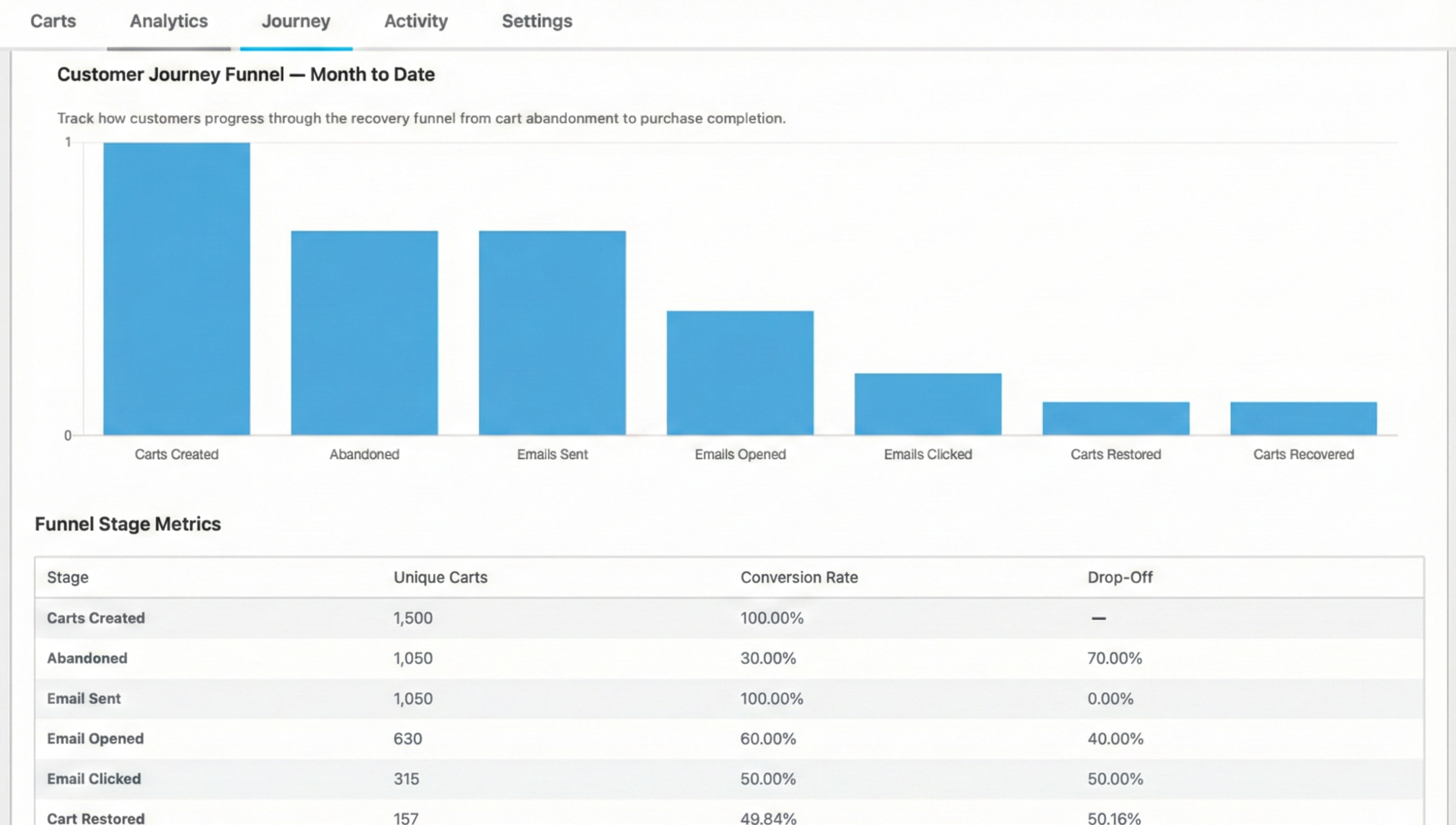
If you see a huge drop-off between “Email Sent” and “Opened,” you know your subject lines might need some work. If they open but don’t click, maybe your call-to-action isn’t strong enough.
It’s like having an X-ray view of your sales funnel.
Deep Dive Analytics 📊Confidence is key when adding new tools to your stack; you need to know that these features are actively generating revenue for your store.
Head over to Downloads » Cart Recovery » Analytics. We’ve built a dashboard that tracks:
You can filter this by date to see how your recovery efforts improve over time.
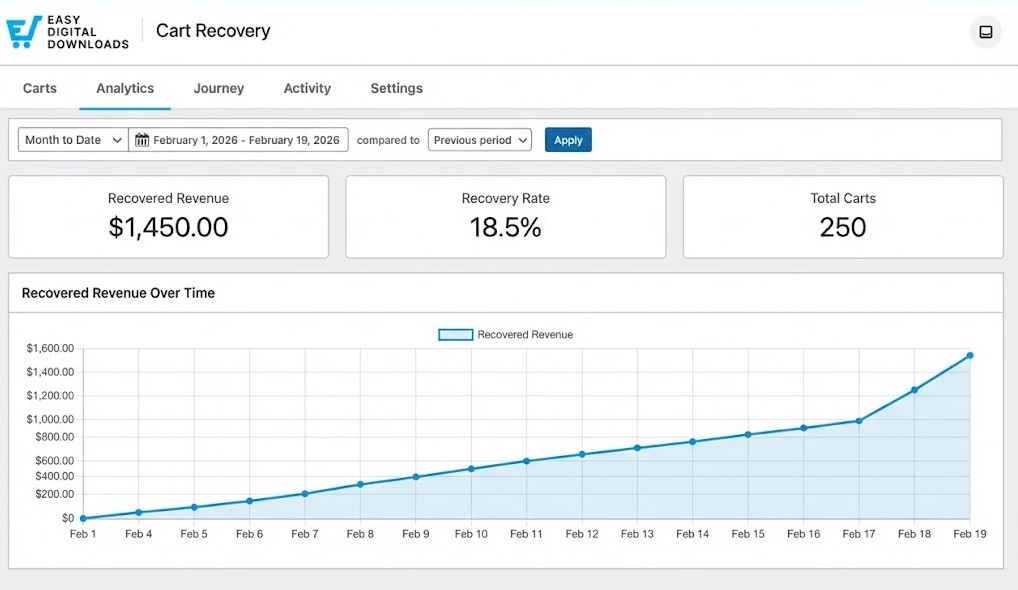
Seeing that “Recovered Revenue” number tick up is a testament to how smart automation acts as a huge boost to eCommerce businesses, maximizing your sales potential without increasing your daily workload.
How to Enable & Use Abandoned Cart Recovery ✅Ready to stop losing sales? If you have an active EDD Pro license, you can turn this on right now.
Note: You’ll need to update your EDD (Pro) plugin to the latest version (3.6.5+).
Step 1. Enable the FeatureFrom your WordPress dashboard, go to Downloads » Cart Recovery.
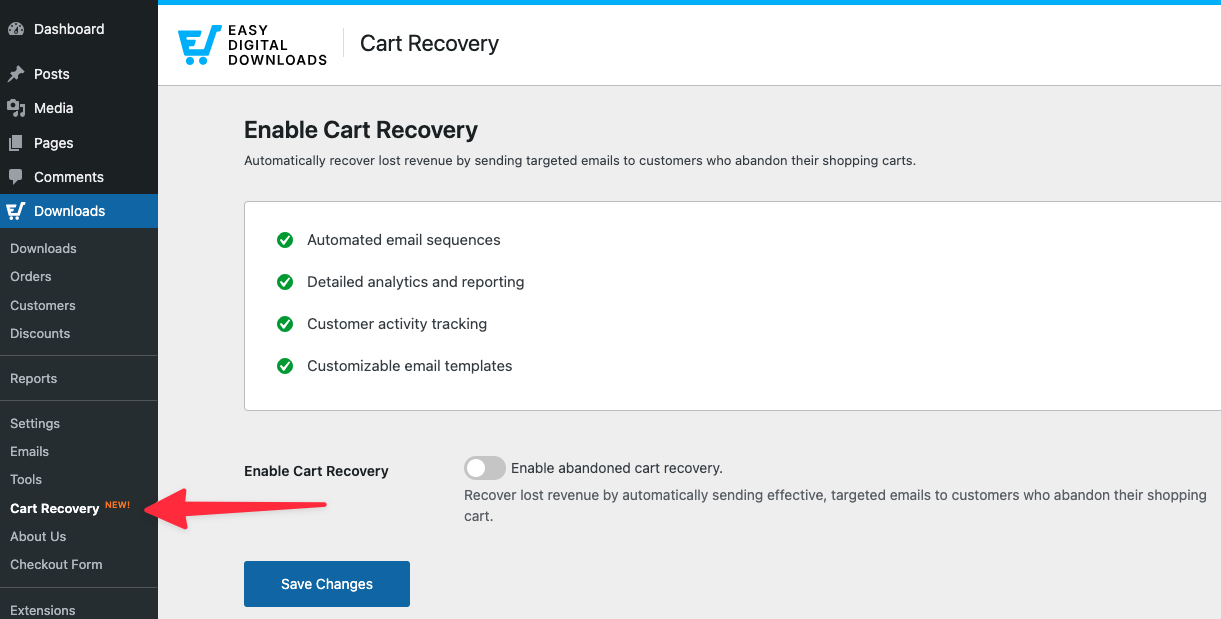
You’ll see a toggle switch. Click Enable abandoned cart recovery, then Save Changes.
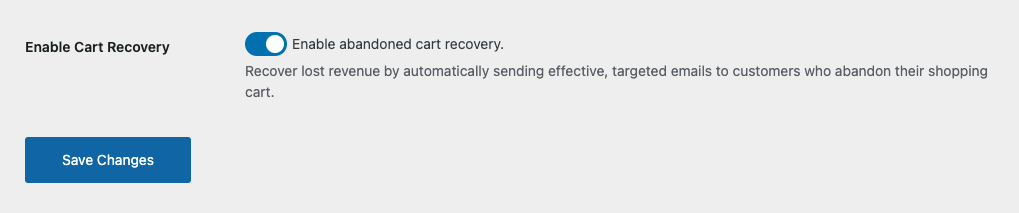 Step 2. Configure Your Settings
Once enabled, the full Cart Recovery menu appears.
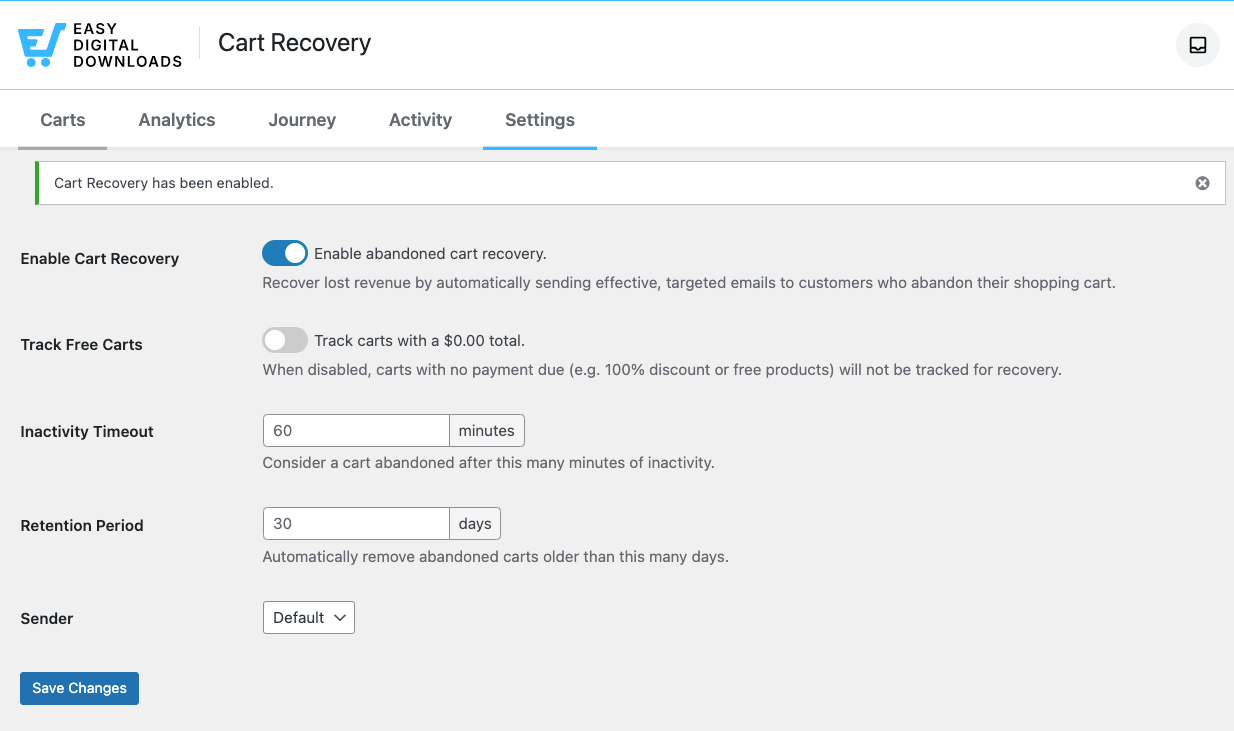
The next step is to decide when a cart is actually considered “abandoned.”
Under the Settings tab, locate the Inactivity Timeout option.
The default is set to 60 minutes. This gives shoppers enough time to come back on their own, but not so long that they’ve forgotten you.
However, you can adjust this from 15 minutes up to 24 hours depending on your store’s traffic.
Step 3. Check Your Sender InfoNext, make sure the Sender is correct.
You can leave it on the default option, or select Custom from the drop-down menu and enter a different Sender Name and Email Address.
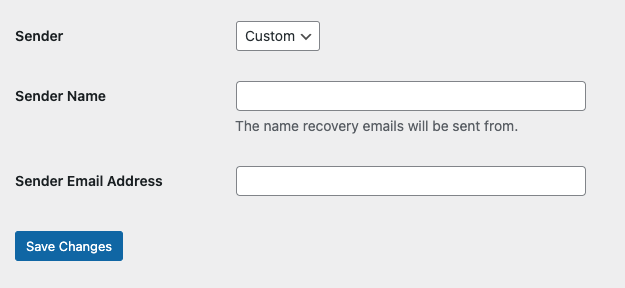
💡 Tip: You want these emails to look like they are coming from a real person or your official brand, not a “do-not-reply” robot.
Step 4. Customize Your EmailsNext, scroll down to Email Templates.
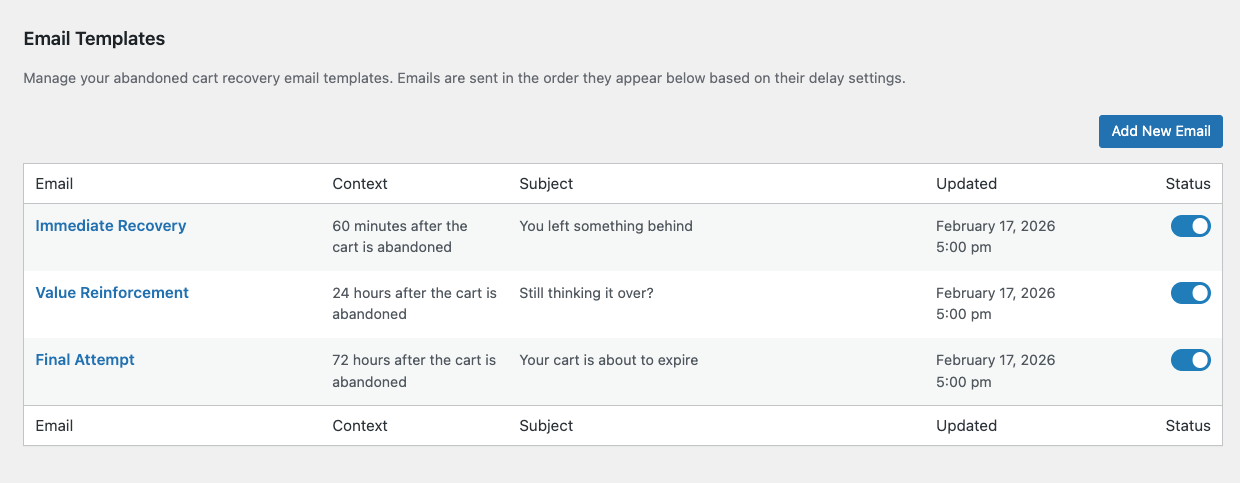
The three default email templates that I mentioned earlier are automatically enabled.
Here, you can select and review or change the default text for the “Immediate Recovery” and follow-up emails.
Within the editor of each email template, you can update the:
Within the message editor, you can insert email smart tags, change the wording, and update the styling.
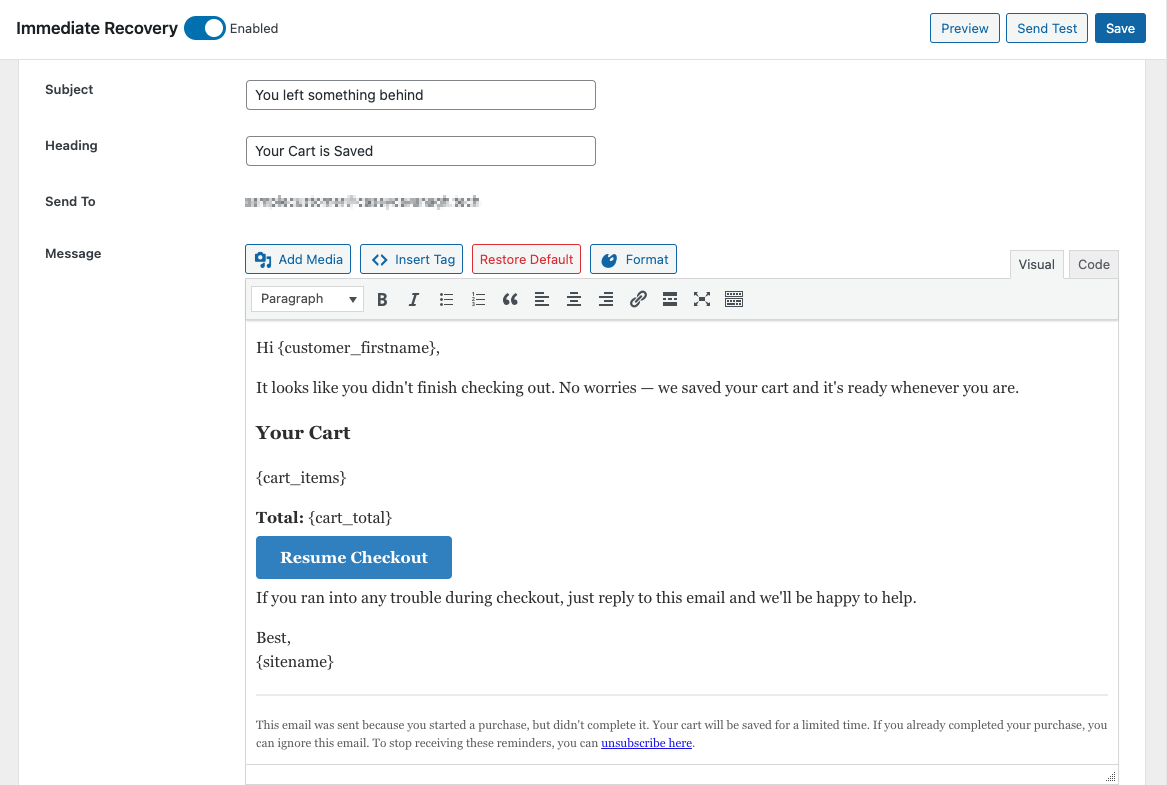
Make sure to keep the {cart_link} and {unsubscribe_link} tags intact!
When you’re done, click Preview or Send Test to see how it looks. Finally, select Save.
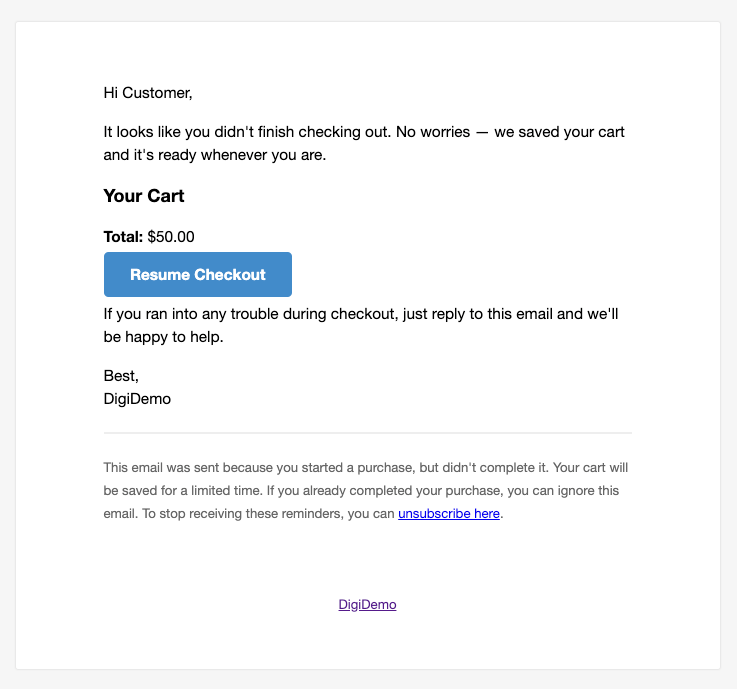
You can also create your own email templates by clicking on the Add New Email button.
⚙️ For more, refer to our Abandoned Cart Recovery documentation.
FAQs About EDD Cart RecoveryLet’s wrap up with some frequently asked questions about abandoned cart recovery and how it works for Easy Digital Downloads.
Yes. As long as the customer enters their email address on the checkout form before abandoning, or if they’re a logged-in user, EDD captures the email and can send recovery messages.
Absolutely. You can attach a discount code specifically to a recovery email template. When the customer clicks the {cart_link}, the discount automatically applies to their cart to sweeten the deal. It replaces any discount currently in the cart.
The system is smart. If a customer completes their purchase, the cart status changes to “Recovered.” Any remaining scheduled emails for that cart are automatically cancelled.
If you’re currently using EDD Lite, the Cart Recovery tab will show you the features you’re missing out on and give you the option to upgrade.
Think about it this way: recovering just a handful of carts could pay for the upgrade itself.
This feature is available now to all EDD Pro users.
For more on this update, feel free to check out our EDD Release Notes and Cart Recovery documentation.
📣 P.S. Be sure to subscribe to our newsletter and follow us on Facebook, Twitter/X, or LinkedIn for more WordPress resources!
| # | Наименование новости | Тональность | Информативность | Дата публикации |
|---|---|---|---|---|
| 1 | Enable Secure Magic Login Links at Checkout in WordPress | 0 | 6.52 | 11-05-2026 |
| 2 | How to Add AI Product Recommendations in WordPress (Easy Digital Downloads) | 0 | 6.24 | 21-01-2026 |
| 3 | Best Marketplace Alternatives for Digital Products | 0 | 9.04 | 02-07-2026 |
| 4 | How to Sell PDFs on WordPress in 2026 (Complete Guide + Best Tools) | 0 | 7.94 | 13-02-2026 |
| 5 | How to Write Effective Digital Product Descriptions | 0 | 8.4 | 30-04-2026 |
| 6 | A Beginner’s Guide to IP Geolocation Detection in WordPress | 0 | 6.22 | 08-05-2023 |
| 7 | How to Sell Digital Planners on WordPress | 0 | 7.34 | 03-03-2026 |
| 8 | How to Get Digital Products Found by AI Search | 0 | 5.95 | 24-04-2026 |
| 9 | Easily Sell Digital Products in Multiple Currencies on WordPress | 0 | 4.95 | 14-04-2026 |
| 10 | 7 Best IP Geolocation Detection Plugins for WordPress | 0 | 8.83 | 15-05-2023 |