Просмотр новости
Найдите то, что Вас интересует
 Спутники
 РН
РН SpaceX
 Роскосмос
 NASA
NASA
СпутникиРНSpaceXРоскосмосNASA
It's almost too good to be true, but this tool made some of my apps launch 50% faster.

Published Aug 13, 2026, 12:00 PM EDT
Brandon has been involved in tech journalism since the year 2000 and was part of the OG team of XDA and Pocketnow. He's currently a staff writer for MakeUseOf, covering mobile and consumer tech. Brandon likes to help people take full advantage of their technology.
He lives outside of Philadelphia, PA, with his wife and three kids. When he's not writing, Brandon plays drums and enjoys listening to music.
He's a graduate of the Villanova School of Business where he got a bachelors degree in finance.
I'm always looking for ways to make my Samsung Galaxy feel faster. My S22, despite having the latest software, is starting to slow down now going on four years of age, and despite tweaking settings to try to make it feel faster, that only got me so far.
I found a utility buried within another app that you probably have never heard of that has given new life to my old Samsung, but it also works if you have a newer Galaxy. As I'll explain in the article, this tool front-loads the loading of certain app components, resulting in some apps opening noticeably faster in my testing, plus significant benefits to scrolling smoothness, especially in Chrome.
Does it actually make your phone faster? Yes (here's proof), and scrolling is much smoother too Credit: Brandon / MakeUseOf
I tested Galaxy App Booster on my S22+ as well as my S22. And the results were actually pretty impressive, more so on the S22 (which I use less often and doesn't have as many apps). So your mileage will vary, and I imagine some people will see significant performance gains, while for others it might be more modest, but on both of my Samsung phones, this tool made a noticeable difference.
After running this tool, scrolling on my S22 got dramatically smoother.
|
App |
Before |
After |
|---|---|---|
|
Amazon |
4 seconds |
2 seconds |
|
YouTube |
4 seconds |
3 seconds |
|
Play Store |
2 seconds |
1 second |
I should also point out that before running Galaxy App Booster, scrolling on long and graphically-intense websites on my S22 would get a bit choppy. Specifically, scrolling on my S22 got dramatically smoother after I used this tool, especially after a cold launch where Chrome doesn't have to work on compiling the app first (more on this later), since it's done ahead of time thanks to Galaxy App Booster. Not only that, but as you can see above from my unscientific test results, some apps like Amazon and Play store opened 50% faster after running the Booster.
How can you try out App Booster? It's pretty simple.
Galaxy Labs is now Good Guardians The only way to get Galaxy App Booster Credit: Brandon / MakeUseOf
You already know about Samsung's fantastic Good Lock app which lets you customize your Galaxy in pretty compelling ways.
The sister app to Good Lock used to be called Galaxy Labs until 2021, which offered numerous under-the-hood utilities like Battery Guardian, Memory Guardian, and Galaxy App Booster, but it's now called Samsung Good Guardians (which you can download here or by searching the Samsung Store or just Google or "Good Guardians").
Once that's installed, you can proceed to downloading the App Booster within Good Guardians.
First download Good Guardian, then install Galaxy App Booster Credit: Brandon / MakeUseOf
Once Good Guardians is downloaded, you'll be presented with the above screen, showing you the available modules. Just pick Galaxy App Booster, install it, and you're good to go.
But what is this app actually doing?
What does Galaxy App Booster actually do? It forces apps to use ahead-of-time (AOT) compilation Credit: Brandon / MakeUseOf
See, Android uses a hybrid runtime, which dictates how Android runs apps you tap on. When you install or update an app, Android compiles the app quickly but leaves most code to run through the interpreter and Just-in-time (JIT) compilation, which compiles frequently-used code on the fly as you use the app. This allows apps to install more quickly, but leaves "extra work" for the phone to do when you actually open the app.
With Galaxy App Booster, your phone compiles apps ahead-of-time using something called ahead-of-time (AOT) compilation. Then, on app launch, Android can load pre-compiled native code instead of interpreting the code or compiling it on the fly, which takes longer. So it's basically doing the work upfront when you run App Booster, instead of waiting until you launch the app. The payoff here is significantly improved loading/launch speed.
The downside to running Galaxy App Booster is that it takes 5-15 minutes to run, and uses a lot of processing power and thus battery, but you can reduce the toll it takes by running Galaxy App Booster while your phone is still on the charger.
With such good results, why not run App Booster every day?
How often can you run App Booster? Run it after system updates, security patches, or if your phone feels slow Credit: Brandon / MakeUseOf
Why not run App Booster daily? Well, you could, but you'd be doing work that's already done. Once App Booster has compiled your apps ahead of time, there's nothing left for it to optimize.
Android handles this same cleanup on its own in the background, usually within a few days of an update, when your phone is idle and charging.
App Booster just does it all at once instead of making you wait. So running it daily gets you nothing but wasted battery and a few minutes of your time—you should save it for after an update (whether full system update or just a security patch) or whenever your phone genuinely starts to feel sluggish.
It really makes a difference, and I was surprised, like I was when I turned off a feature on Samsung phones that was supposed to help but actually made my phone slower.
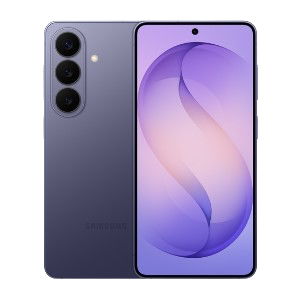
$780 $853.76 Save $73.76
SoC Snapdragon 8 Elite Gen 5
The Samsung Galaxy S26 features a 6.3-inch 120Hz display, a Snapdragon 8 Elite Gen 5 chip, and a 4,300 mAh battery. It includes a 50MP main camera with enhanced AI software, 256GB of base storage, and a slim 7.2mm profile, focusing on fast daily performance.
Display 6.3-inch Dynamic AMOLED 2x
| # | Наименование новости | Тональность | Информативность | Дата публикации |
|---|---|---|---|---|
| 1 | My Samsung's gorgeous screen had been running below its real resolution the whole time | 0 | 9.03 | 12-08-2026 |
| 2 | Найден способ ускорить Android-смартфон | 0 | 35 | 24-08-2026 |
| 3 | 5 ways I speed up my Android phone beyond clearing system cache - all for free | 0 | 11.47 | 29-07-2026 |
| 4 | I changed one display setting and my Android stopped dying by evening | 0 | 10 | 14-08-2026 |
| 5 | I ditched Galaxy's AI battery modes, and my phone lasted longer without them | 0 | 9.32 | 14-08-2026 |
| 6 | Раскрыты способы заставить старый смартфон работать быстрее | 0 | 10 | 28-07-2026 |
| 7 | Samsung Browser 30.0.2.61 by Samsung Electronics Co., Ltd. | 0 | 2 | 08-07-2026 |
| 8 | Раскрыты частые причины замедления смартфона | 0 | 10 | 30-07-2026 |
| 9 | I stopped using Samsung Messages after it got discontinued, but this developer brought it back | 0 | 12.49 | 11-08-2026 |
| 10 | Samsung Galaxy Themes 6.0.12.6 by Samsung Electronics Co., Ltd. | 0 | 1 | 08-07-2026 |